Why does everyone generate around 512px?
With Stable Diffusion 1.5, you basically generate images at 512px × 512px.
YouTube videos these days are 1920×1080 (1080p), and if you draw, your canvas might be around 3000px. Yet in image generation, everyone generates at around 512px. Why such a low resolution?
There are two main reasons.
- The model was trained on images around 512px
- Raising the resolution makes the compute cost shoot up
1. The model was trained around 512px
Stable Diffusion 1.5 was trained almost entirely on 512px × 512px square images.
- Portrait and landscape images were also cropped to 512px squares for training
- As a result, it is good at "drawing a square of about 512px", but it never practiced "bigger pictures" or "extreme portrait/landscape shapes" in the first place
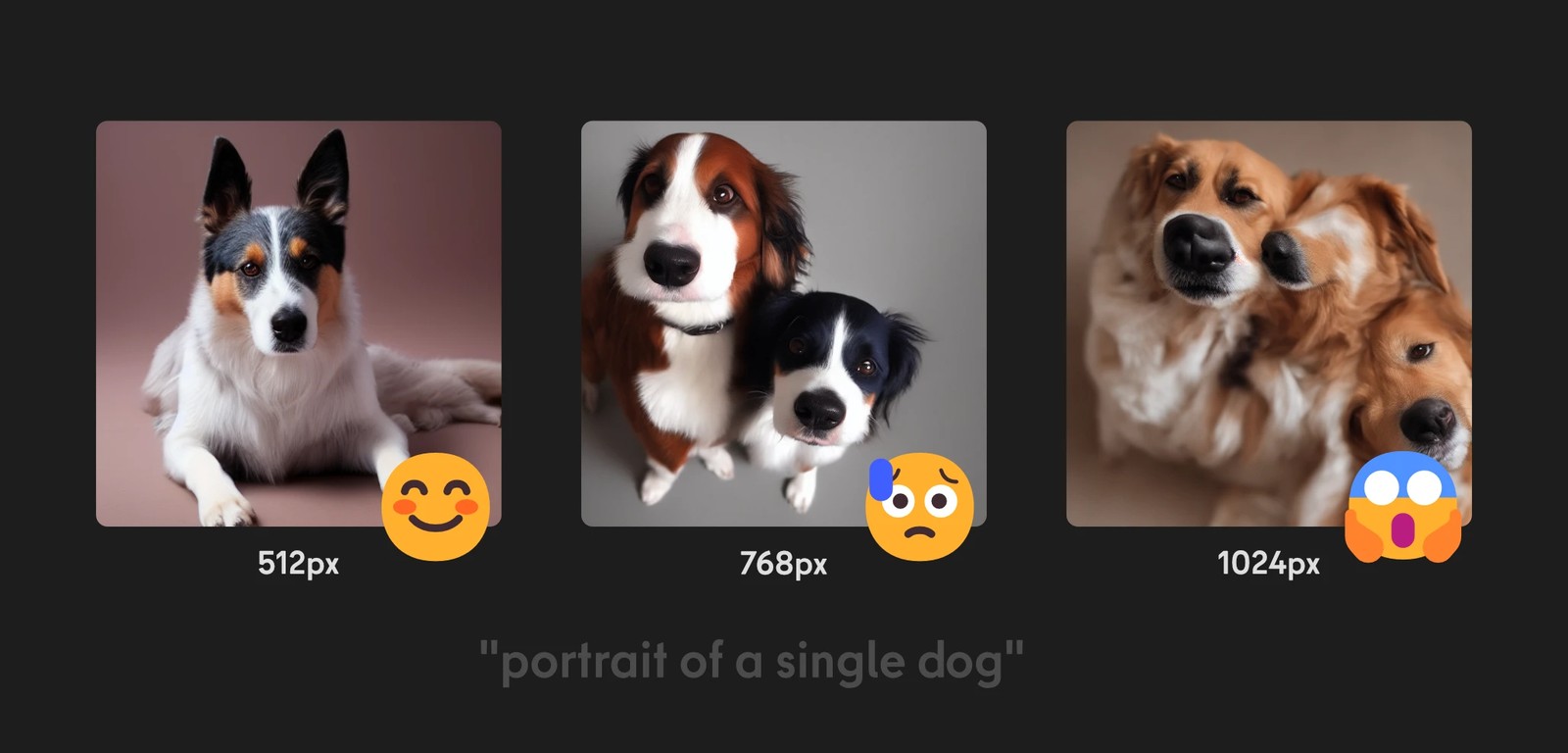
In fact, if you generate at 768px or 1024px, the dog may split into several dogs even though you wrote a single dog.
So the real reason is not so much "we generate at 512px" as "it only generates well at around 512px".
Solution: Hires.fix
One solution is Hires.fix.
- First, generate an image at around 512 × 512px, the size the model is good at
- Then upscale it and have the model redraw it, using the upscaled image as a rough draft (image2image)
Instead of making it draw at a size it is bad at right away, the idea is to "go through the size it is good at first, then turn that into a bigger picture".
2. Compute grows quickly with resolution
The other reason is simply the amount of computation.
- Doubling the width and height means four times as many pixels
- The number of diffusion steps and the model size stay the same, so VRAM and compute time end up close to "×4"
The Stable Diffusion 1.5 model itself is fairly compact, but even so, asking it to draw a large resolution like 1024px or 2000px as a single image in one go is quite heavy.
Solution: saving VRAM and tiled methods
When you want a higher resolution, you have a few options.
-
Save VRAM
- Use the techniques in Speed and Efficiency and adjust the model and precision to keep VRAM use down
-
Use tiled methods
- Instead of generating the whole image at once, use Ultimate SD upscale, which splits the image into tiles and joins them back together
- If you increase the number of tiles to 4, 8, and so on, in theory you can make images of any resolution you like
After SDXL
Everything so far is based on the SD1.5 generation. Later models have gradually changed how they handle training resolution and aspect ratio.
-
NovelAI Diffusion and later
- NovelAI is an image generation service that specialized in anime-style images early on. They put work into their dataset and also trained on portrait and landscape images, which made it easier to generate at a variety of aspect ratios.
- Since then, it has become common for models to be trained on a mix of images at different resolutions.
-
SDXL
- The base training resolution went up to 1024px × 1024px.
- Newer models increasingly handle everything from low resolutions up to much higher ones (1–2 megapixels) fairly reliably.
- Thanks to architectural improvements, the extreme "compute explodes the moment you raise the resolution" problem is less severe than it used to be.
Still, the following approach has not changed.
- Try generating at the "recommended resolution" the model is best at
- Use that as the base and expand it with Hires.fix, upscaling, or tiled methods as needed
First, "generate one image in the resolution range the model has practiced". For SD1.5, 512px simply happened to be that starting point.