What We're Basically Doing
Let's try executing a ComfyUI workflow "from the outside" via the API.
It's simple: just POST API-formatted JSON (= prompt) to http://127.0.0.1:8188/prompt.
With this, the ComfyUI server receives the command "execute this workflow", queues it, executes it, and returns a prompt_id (execution ID).
It's a bit confusing, but the "prompt" here refers to the entire workflow (execution graph), not just the text prompt.
Text is just a part of it, for example, inputs.text of CLIPTextEncode falls under this.
This time, let's try executing it from Python.
Start ComfyUI
The API is not a mechanism that "eliminates the need to start ComfyUI".
Python sends commands to the running ComfyUI server.
- Start ComfyUI
- Ensure
http://127.0.0.1:8188 can be opened in your browser
Prepare Workflow for API
Workflow to Use (SD1.5 text2image)
For now, we will use the simplest Stable Diffusion 1.5 text2image.
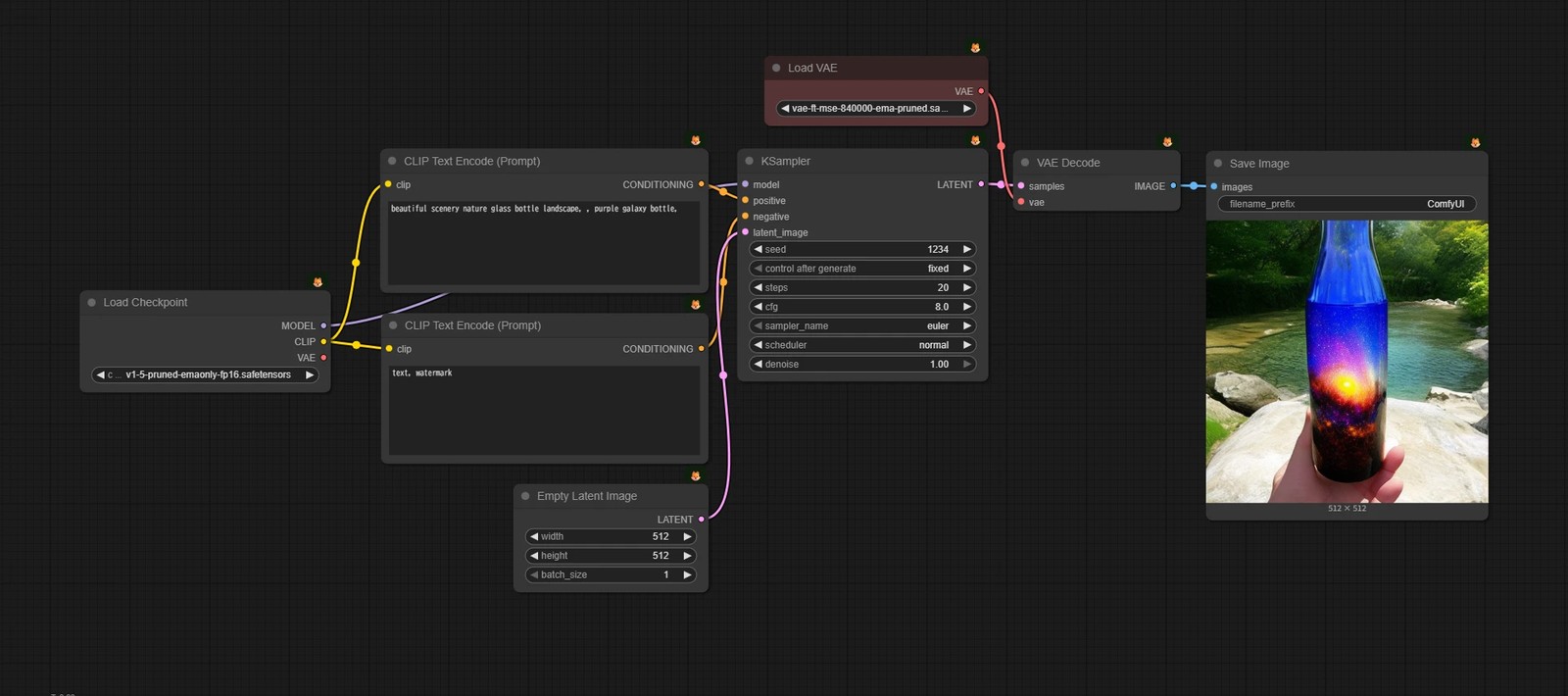
SD1.5_text2image_vae-ft-mse-840000.json
{
"id": "8b9f7796-0873-4025-be3c-0f997f67f866",
"revision": 0,
"last_node_id": 10,
"last_link_id": 10,
"nodes": [
{
"id": 8,
"type": "VAEDecode",
"pos": [
1209,
188
],
"size": [
210,
46
],
"flags": {},
"order": 6,
"mode": 0,
"inputs": [
{
"name": "samples",
"type": "LATENT",
"link": 7
},
{
"name": "vae",
"type": "VAE",
"link": 10
}
],
"outputs": [
{
"name": "IMAGE",
"type": "IMAGE",
"slot_index": 0,
"links": [
9
]
}
],
"properties": {
"cnr_id": "comfy-core",
"ver": "0.3.33",
"Node name for S&R": "VAEDecode"
},
"widgets_values": []
},
{
"id": 3,
"type": "KSampler",
"pos": [
863,
186
],
"size": [
315,
262
],
"flags": {},
"order": 5,
"mode": 0,
"inputs": [
{
"name": "model",
"type": "MODEL",
"link": 1
},
{
"name": "positive",
"type": "CONDITIONING",
"link": 4
},
{
"name": "negative",
"type": "CONDITIONING",
"link": 6
},
{
"name": "latent_image",
"type": "LATENT",
"link": 2
}
],
"outputs": [
{
"name": "LATENT",
"type": "LATENT",
"slot_index": 0,
"links": [
7
]
}
],
"properties": {
"cnr_id": "comfy-core",
"ver": "0.3.33",
"Node name for S&R": "KSampler"
},
"widgets_values": [
1234,
"fixed",
20,
8,
"euler",
"normal",
1
]
},
{
"id": 9,
"type": "SaveImage",
"pos": [
1451,
189
],
"size": [
354.2876035004722,
433.23967321788405
],
"flags": {},
"order": 7,
"mode": 0,
"inputs": [
{
"name": "images",
"type": "IMAGE",
"link": 9
}
],
"outputs": [],
"properties": {
"cnr_id": "comfy-core",
"ver": "0.3.33"
},
"widgets_values": [
"ComfyUI"
]
},
{
"id": 6,
"type": "CLIPTextEncode",
"pos": [
415,
186
],
"size": [
411.95503173828126,
151.0030493164063
],
"flags": {},
"order": 3,
"mode": 0,
"inputs": [
{
"name": "clip",
"type": "CLIP",
"link": 3
}
],
"outputs": [
{
"name": "CONDITIONING",
"type": "CONDITIONING",
"slot_index": 0,
"links": [
4
]
}
],
"properties": {
"cnr_id": "comfy-core",
"ver": "0.3.33",
"Node name for S&R": "CLIPTextEncode"
},
"widgets_values": [
"beautiful scenery nature glass bottle landscape, , purple galaxy bottle,"
]
},
{
"id": 7,
"type": "CLIPTextEncode",
"pos": [
416.1970166015625,
392.37848510742185
],
"size": [
410.75801513671877,
158.82607910156253
],
"flags": {},
"order": 4,
"mode": 0,
"inputs": [
{
"name": "clip",
"type": "CLIP",
"link": 5
}
],
"outputs": [
{
"name": "CONDITIONING",
"type": "CONDITIONING",
"slot_index": 0,
"links": [
6
]
}
],
"properties": {
"cnr_id": "comfy-core",
"ver": "0.3.33",
"Node name for S&R": "CLIPTextEncode"
},
"widgets_values": [
"text, watermark"
]
},
{
"id": 5,
"type": "EmptyLatentImage",
"pos": [
582.1350317382813,
606.5799999999999
],
"size": [
244.81999999999994,
106
],
"flags": {},
"order": 0,
"mode": 0,
"inputs": [],
"outputs": [
{
"name": "LATENT",
"type": "LATENT",
"slot_index": 0,
"links": [
2
]
}
],
"properties": {
"cnr_id": "comfy-core",
"ver": "0.3.33",
"Node name for S&R": "EmptyLatentImage"
},
"widgets_values": [
512,
512,
1
]
},
{
"id": 10,
"type": "VAELoader",
"pos": [
896.9256198347109,
69.4815990090115
],
"size": [
281.0743801652891,
58
],
"flags": {},
"order": 1,
"mode": 0,
"inputs": [],
"outputs": [
{
"name": "VAE",
"type": "VAE",
"links": [
10
]
}
],
"properties": {
"cnr_id": "comfy-core",
"ver": "0.3.76",
"Node name for S&R": "VAELoader"
},
"widgets_values": [
"vae-ft-mse-840000-ema-pruned.safetensors"
],
"color": "#322",
"bgcolor": "#533"
},
{
"id": 4,
"type": "CheckpointLoaderSimple",
"pos": [
38.10000000000001,
363.8900000000004
],
"size": [
315,
98
],
"flags": {},
"order": 2,
"mode": 0,
"inputs": [],
"outputs": [
{
"name": "MODEL",
"type": "MODEL",
"slot_index": 0,
"links": [
1
]
},
{
"name": "CLIP",
"type": "CLIP",
"slot_index": 1,
"links": [
3,
5
]
},
{
"name": "VAE",
"type": "VAE",
"slot_index": 2,
"links": []
}
],
"properties": {
"cnr_id": "comfy-core",
"ver": "0.3.33",
"Node name for S&R": "CheckpointLoaderSimple"
},
"widgets_values": [
"v1-5-pruned-emaonly-fp16.safetensors"
]
}
],
"links": [
[
1,
4,
0,
3,
0,
"MODEL"
],
[
2,
5,
0,
3,
3,
"LATENT"
],
[
3,
4,
1,
6,
0,
"CLIP"
],
[
4,
6,
0,
3,
1,
"CONDITIONING"
],
[
5,
4,
1,
7,
0,
"CLIP"
],
[
6,
7,
0,
3,
2,
"CONDITIONING"
],
[
7,
3,
0,
8,
0,
"LATENT"
],
[
9,
8,
0,
9,
0,
"IMAGE"
],
[
10,
10,
0,
8,
1,
"VAE"
]
],
"groups": [],
"config": {},
"extra": {
"ds": {
"scale": 0.9090909090909091,
"offset": [
61.89999999999999,
30.518400990988496
]
},
"frontendVersion": "1.34.6",
"VHS_latentpreview": false,
"VHS_latentpreviewrate": 0,
"VHS_MetadataImage": true,
"VHS_KeepIntermediate": true
},
"version": 0.4
}
Model Download
📂ComfyUI/
└── 📂models/
├── 📂checkpoints/
│ └── v1-5-pruned-emaonly-fp16.safetensors
└── 📂vae/
└── vae-ft-mse-840000-ema-pruned.safetensors
Get Workflow for API
- 1. Open the workflow above in ComfyUI Node UI
- 2. Select
File -> Export (API) from the menu
- 3. Save with a recognizable name (e.g.
SD1.5_text2image_API.json)
Sample
SD1.5_text2image_API.json
{
"3": {
"inputs": {
"seed": 1234,
"steps": 20,
"cfg": 8,
"sampler_name": "euler",
"scheduler": "normal",
"denoise": 1,
"model": [
"4",
0
],
"positive": [
"6",
0
],
"negative": [
"7",
0
],
"latent_image": [
"5",
0
]
},
"class_type": "KSampler",
"_meta": {
"title": "KSampler"
}
},
"4": {
"inputs": {
"ckpt_name": "v1-5-pruned-emaonly-fp16.safetensors"
},
"class_type": "CheckpointLoaderSimple",
"_meta": {
"title": "Load Checkpoint"
}
},
"5": {
"inputs": {
"width": 512,
"height": 512,
"batch_size": 1
},
"class_type": "EmptyLatentImage",
"_meta": {
"title": "Empty Latent Image"
}
},
"6": {
"inputs": {
"text": "beautiful scenery nature glass bottle landscape, , purple galaxy bottle,",
"clip": [
"4",
1
]
},
"class_type": "CLIPTextEncode",
"_meta": {
"title": "CLIP Text Encode (Prompt)"
}
},
"7": {
"inputs": {
"text": "text, watermark",
"clip": [
"4",
1
]
},
"class_type": "CLIPTextEncode",
"_meta": {
"title": "CLIP Text Encode (Prompt)"
}
},
"8": {
"inputs": {
"samples": [
"3",
0
],
"vae": [
"10",
0
]
},
"class_type": "VAEDecode",
"_meta": {
"title": "VAE Decode"
}
},
"9": {
"inputs": {
"filename_prefix": "ComfyUI",
"images": [
"8",
0
]
},
"class_type": "SaveImage",
"_meta": {
"title": "Save Image"
}
},
"10": {
"inputs": {
"vae_name": "vae-ft-mse-840000-ema-pruned.safetensors"
},
"class_type": "VAELoader",
"_meta": {
"title": "Load VAE"
}
}
}
Difference from Normal Workflow JSON
Normal JSON contains "information easy to edit/share in UI".
API workflow strips away such extra information and is in a convenient form to pass to the server for execution.
Run It First
Python Environment Preparation
Create a virtual environment and install requests for HTTP communication.
python -m venv venv
venv\Scripts\activate
pip install requests
run_min.py
This is minimal code that just reads SD1.5_text2image_API.json and throws it to /prompt.
It is basically the same as pressing ▷Run in the node UI.
import json
import requests
BASE = "http://127.0.0.1:8188"
prompt = json.load(open("SD1.5_text2image_API.json", encoding="utf-8"))
res = requests.post(f"{BASE}/prompt", json={"prompt": prompt}).json()
print(res)
File Placement
your_project/
├── run_min.py
└── SD1.5_text2image_API.json
Execute
Run run_min.py in the terminal.
cd path\to\your_project
venv\Scripts\activate
python run_min.py
Let's check if it ran successfully.
{"prompt_id": "...", ...} returns on the Python side (This is the execution ID.)
- Execution logs appear in the ComfyUI terminal
- Image file increases in
ComfyUI/output/
- It should be saved in the same location as when executing with the node UI
If you can do this far, you are executing via API.
Change Prompt from CLI
Of course, you can change parameters by directly editing the JSON for API.
However, if you want to execute continuously without polluting the original file, it is easier to handle by replacing with Python.
What to Rewrite (In Case of This JSON)
This time, we will only change the "prompt".
- Positive prompt:
inputs.text of node 6
Note: Node ID is Not Fixed
In the example on this page, 6 is used, but this is only because it is so in this distributed JSON.
When doing it with your own workflow, it is surest to open the JSON and look for it.
e.g. SD1.5_text2image_API.json
"6": {
"inputs": {
"text": "beautiful scenery nature glass bottle landscape, , purple galaxy bottle,",
"clip": [
"4",
1
]
},
"class_type": "CLIPTextEncode",
"_meta": {
"title": "CLIP Text Encode (Prompt)"
}
},
run.py (Prompt Input)
import json
import requests
BASE = "http://127.0.0.1:8188"
prompt = json.load(open("SD1.5_text2image_API.json", encoding="utf-8"))
pos = input("positive prompt: ").strip()
if pos:
prompt["6"]["inputs"]["text"] = pos
res = requests.post(f"{BASE}/prompt", json={"prompt": prompt}).json()
print(res)
print("done (check ComfyUI/output)")
Execute
Run in the same way as before.
cd path\to\your_project
venv\Scripts\activate
python run.py
This time, input of parameters is required during the process.
positive prompt: Enter your favorite prompt
If the image is saved in ComfyUI/output/ with that prompt, it is OK.
Once You Get the Feel, Just Build It
Although we only used API to "execute" this time, there are various other things in the API.
- Receive progress in real time (WebSocket)
- Control queue (stop, interrupt, etc.)
- Image upload (pass to i2i input)
- Get node input specifications (foothold to automate workflow editing)
On this page, it is enough if you just get the atmosphere that "you can execute workflow from outside".
Now, feel free to build whatever you want, whether it's vibe coding or anything else!