
What is ReActor?
Face swap (Deepfake) has existed for years, but back then, it required collecting hundreds of face images of the same person for training.
ReActor (more precisely, its core InsightFace) allows you to swap a face in an image or video using just one single face photo as a reference.
Although more flexible ID transfer methods based on diffusion models have appeared recently, ReActor is still widely used because it is "relatively lightweight" and "stable due to its lack of flexibility (in a good way)."
Custom Node & Installation
Installation Method
This node is a bit tricky to install and often doesn't work just by installing it from ComfyUI Manager.
- Install the ReActor node from ComfyUI Manager.
- Run
install.batlocated inComfyUI/custom_nodes/ComfyUI-ReActor. - For Windows users: This alone is usually not enough; you need to install InsightFace separately.
- See details: How to install InsightFace
- Restart ComfyUI.
FaceSwap (inswapper)
Basic FaceSwap simply involves inputting a "Source Image" and a "Reference Face Image" into the ReActor node.
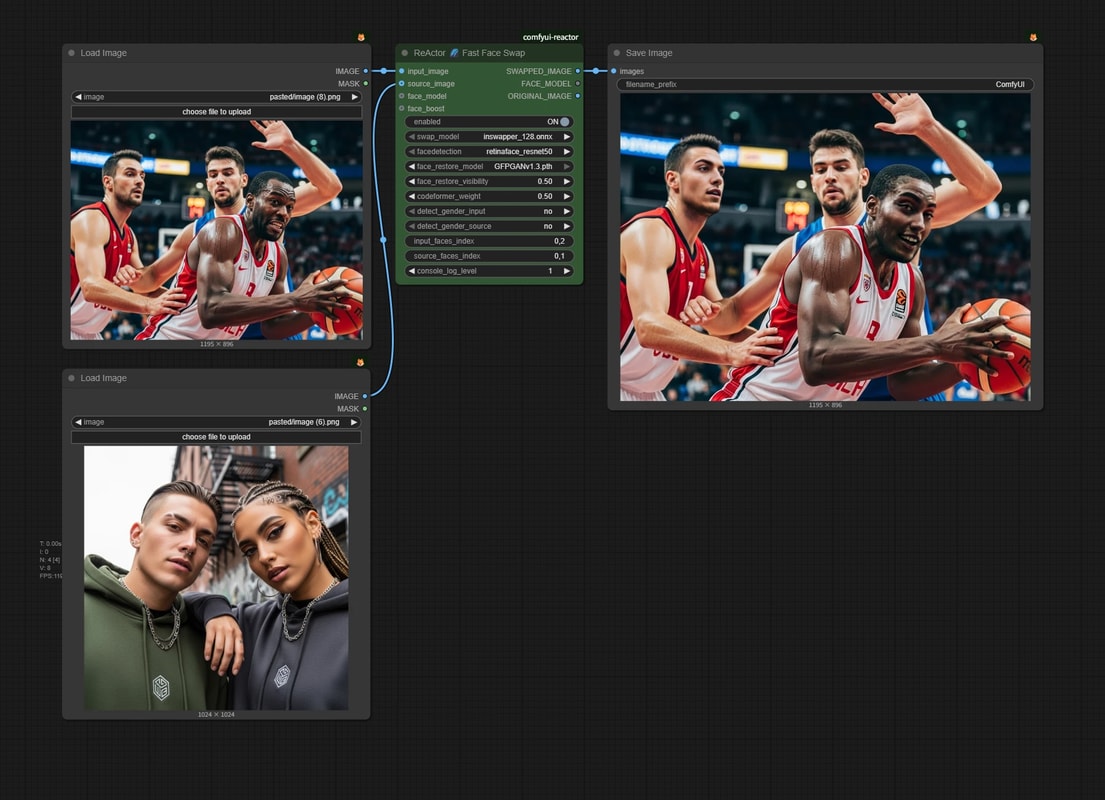
input_image- Connect the original image where you want to swap the face.
source_image- Connect the reference face image (e.g., a single face photo).
Key Parameters
face_restore_model- If you select
GFPGANv1.3, GFPGAN face restoration will be applied after FaceSwap. - Since
inswapperresizes the face part to 128px square for processing, details are easily lost, so this post-processing is important. - Note: It tends to give a somewhat "smooth/flat" impression.
- If you select
detect_gender_input/detect_gender_source- Settings to automatically detect the gender of the input/source images.
- If the result looks unnatural due to gender differences, try toggling these ON/OFF.
input_faces_index- If there are multiple faces in the
input_image, specify which face to target. 0is the first found face,1is the second, and so on.- You can specify multiple faces with comma separation like
0,1to swap multiple people at once.
- If there are multiple faces in the
source_faces_index- If there are multiple faces in the
source_image, specify which face to use, similar toinput_faces_index.
- If there are multiple faces in the
Using Another FaceSwap Model (HyperSwap)
The inswapper model used above is an older model, and the high-resolution version has been sealed by the developer due to social impact concerns.
There are several alternative models, but let's try HyperSwap developed by FaceFusion Labs.
Here is an example using hyperswap_1a_256.onnx.
Model Download
- Download hyperswap_1a_256.onnx.
- Place it in the following location:
📂ComfyUI/
  └── 📂models/
      └── 📂hyperswap/  <-- Create this folder
          └── hyperswap_1a_256.onnx
Workflow Settings
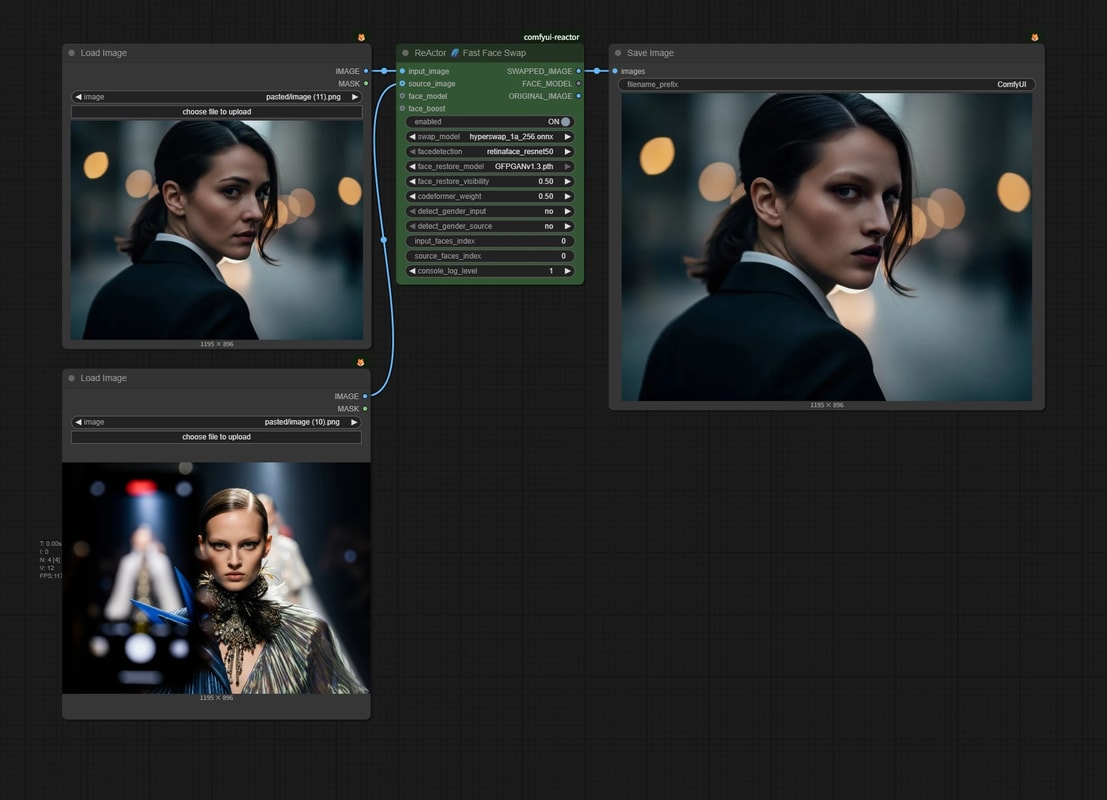
- Change the
swap_modelof the ReActor node tohyperswap_1a_256.
About NSFW Filter
To prevent the repository from being deleted, ReActor has a built-in filter for NSFW images. Therefore, if you use an image containing NSFW content, it will be rejected.
I won't go into detail, but there are simple ways to bypass this. ( Detailer might be useful... maybe. )