What is a Type?
It refers to "Type of Data".
"Image data" for images, "text data" for text, "numerical data" for numbers, and so on.
It is important for programming studies, but in ComfyUI, since it is designed to "connect only where it connects", you honestly don't need to think that deeply.
Therefore, mistakes in the data type to connect almost never cause errors, but since it is not zero, let's lightly know the concept of this "type".
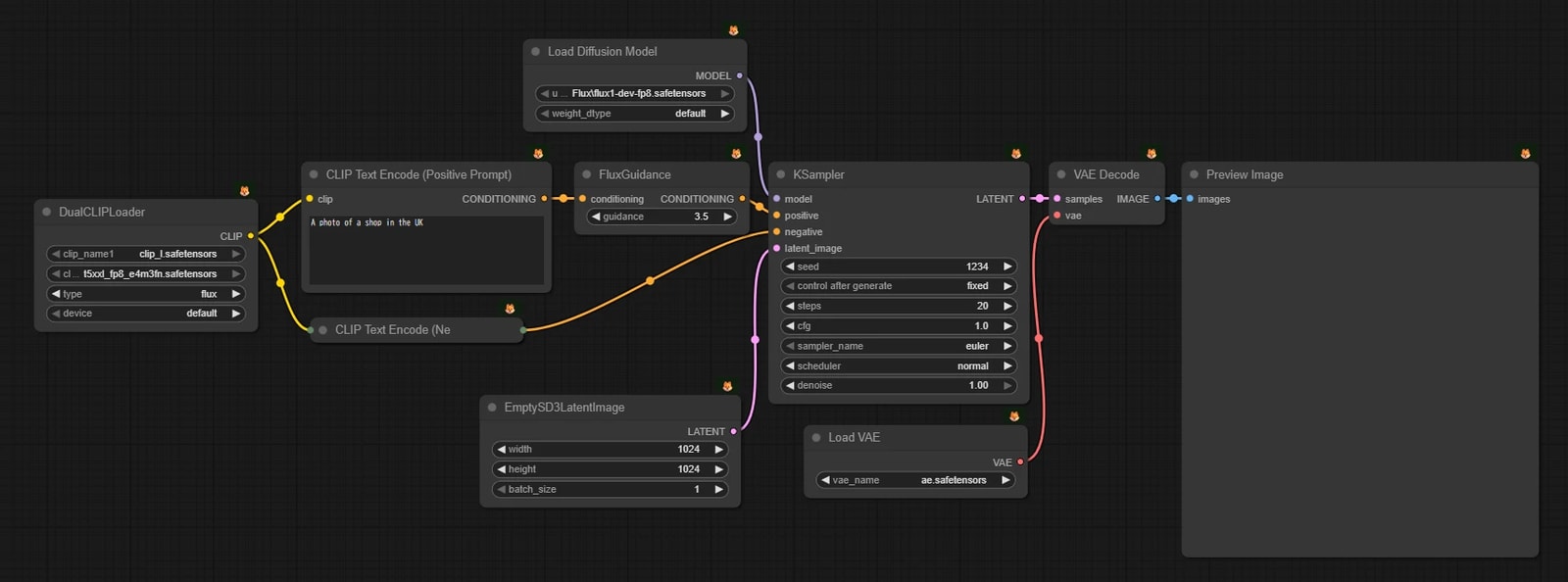
Basic Data Types
If you study the mechanism of image generation AI, you will naturally understand. You don't need to try hard to memorize here.
- MODEL
- CLIP (Conditioning)
- VAE (Latent Space)
- CONDITIONING
- LATENT (Latent Space)
- IMAGE
- MASK
Primitive (Basic) Data Types
Numbers and characters themselves.
- INT (Integer)
- Integers like
1, 20, 1024.
- FLOAT (Floating point number)
- STRING (Text)
- Character strings. Prompt input fields etc. correspond to this.
Uniquely Defined Types
Since ComfyUI has high extensibility, unique "types" may be added depending on the custom node.
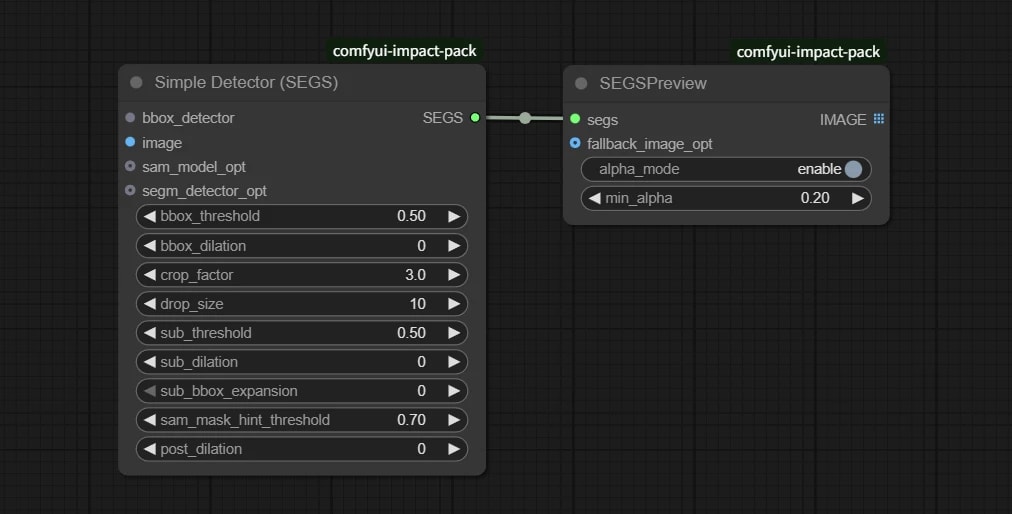
For example, in the famous Impact Pack, a unique type called SEGS appears.
This is a collection of several data, but even so, these also connect only where they connect.
If you get lost, just try pulling the wire. If it connects, it's OK!
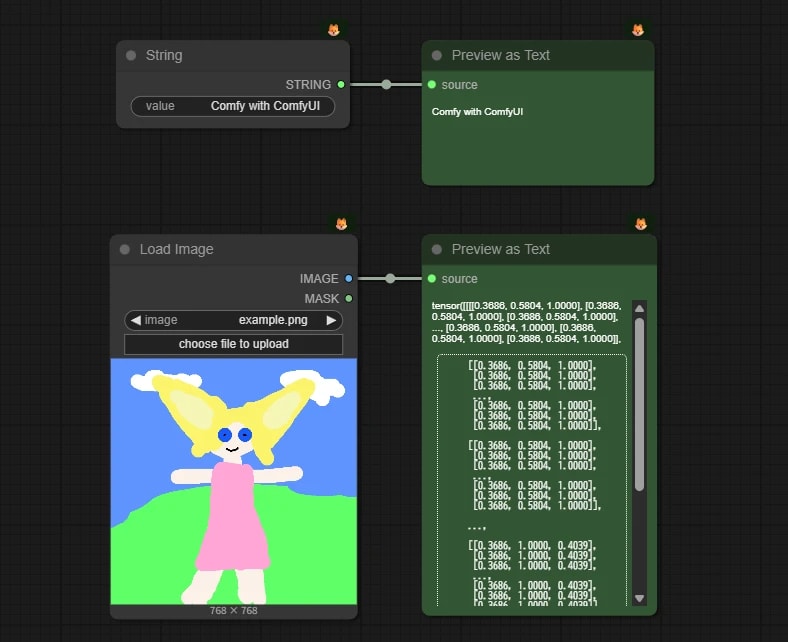
Preview as Text Node
Node to preview arbitrary data as text.
{
  "id": "03a337b9-6960-48b0-b9f3-fa5ee2162a55",
  "revision": 0,
  "last_node_id": 7,
  "last_link_id": 6,
  "nodes": [
    {
      "id": 7,
      "type": "PrimitiveString",
      "pos": [
        1356.2677701706702,
        145.99414983243696
      ],
      "size": [
        234,
        58
      ],
      "flags": {},
      "order": 0,
      "mode": 0,
      "inputs": [],
      "outputs": [
        {
          "name": "STRING",
          "type": "STRING",
          "links": [
            6
          ]
        }
      ],
      "properties": {
        "cnr_id": "comfy-core",
        "ver": "0.3.73",
        "Node name for S&R": "PrimitiveString"
      },
      "widgets_values": [
        "Comfy with ComfyUI"
      ]
    },
    {
      "id": 3,
      "type": "LoadImage",
      "pos": [
        1349.945456121083,
        340.0272076836765
      ],
      "size": [
        248.080078125,
        355
      ],
      "flags": {},
      "order": 1,
      "mode": 0,
      "inputs": [],
      "outputs": [
        {
          "name": "IMAGE",
          "type": "IMAGE",
          "links": [
            2
          ]
        },
        {
          "name": "MASK",
          "type": "MASK",
          "links": null
        }
      ],
      "properties": {
        "cnr_id": "comfy-core",
        "ver": "0.3.73",
        "Node name for S&R": "LoadImage"
      },
      "widgets_values": [
        "example.png",
        "image"
      ]
    },
    {
      "id": 2,
      "type": "PreviewAny",
      "pos": [
        1662.0281007491828,
        145.99414983243696
      ],
      "size": [
        232.53944402704747,
        115.04733283245679
      ],
      "flags": {},
      "order": 2,
      "mode": 0,
      "inputs": [
        {
          "name": "source",
          "type": "*",
          "link": 6
        }
      ],
      "outputs": [],
      "properties": {
        "cnr_id": "comfy-core",
        "ver": "0.3.73",
        "Node name for S&R": "PreviewAny"
      },
      "widgets_values": [],
      "color": "#232",
      "bgcolor": "#353"
    },
    {
      "id": 4,
      "type": "PreviewAny",
      "pos": [
        1662.0281007491828,
        340.0272076836765
      ],
      "size": [
        235.37950413223143,
        351.3529752066115
      ],
      "flags": {},
      "order": 3,
      "mode": 0,
      "inputs": [
        {
          "name": "source",
          "type": "*",
          "link": 2
        }
      ],
      "outputs": [],
      "properties": {
        "cnr_id": "comfy-core",
        "ver": "0.3.73",
        "Node name for S&R": "PreviewAny"
      },
      "widgets_values": [],
      "color": "#232",
      "bgcolor": "#353"
    }
  ],
  "links": [
    [
      2,
      3,
      0,
      4,
      0,
      "*"
    ],
    [
      6,
      7,
      0,
      2,
      0,
      "*"
    ]
  ],
  "groups": [],
  "config": {},
  "extra": {
    "ds": {
      "scale": 1,
      "offset": [
        -922.2506973969967,
        8.419655434782356
      ]
    },
    "frontendVersion": "1.33.9",
    "VHS_latentpreview": false,
    "VHS_latentpreviewrate": 0,
    "VHS_MetadataImage": true,
    "VHS_KeepIntermediate": true
  },
  "version": 0.4
}
As debugging, there are many opportunities to display numbers and text.
I don't know if you will use it, but you can also check images and latent representations as text.