Symptom
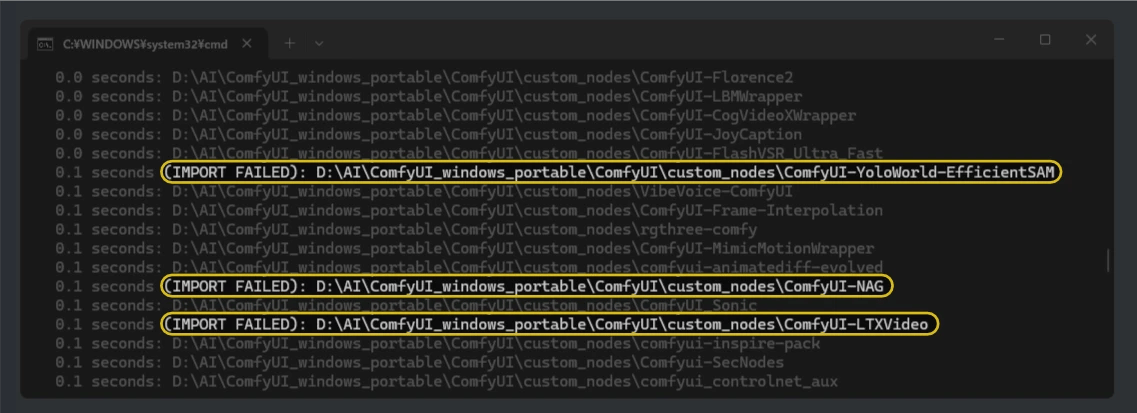
- When you start ComfyUI, several
(IMPORT FAILED)lines show up in the terminal, and certain custom nodes don't work or don't appear in the node list.
When it happens
- Right after starting ComfyUI.
- When custom nodes you installed don't show up in the node list.
Cause
- A required library is missing, or you're using an unsupported Python / PyTorch version.
- Scroll up from
(IMPORT FAILED)in the terminal and you'll see something likeModuleNotFoundError: No module named 'facenet_pytorch', saying a library that custom node needs couldn't be found.
- Scroll up from
- There's a path or OS-specific problem.
- For example, non-ASCII characters (such as Japanese) in the folder path can cause errors like
UnicodeDecodeError('cp932' codec can't decode byte 0x87...).
- For example, non-ASCII characters (such as Japanese) in the folder path can cause errors like
- It conflicts with another custom node.
- Nodes with older frontend code or their own unusual dependencies sometimes don't get along with newer ComfyUI and fail to load.
Solution
-
If libraries are missing
- If you're comfortable with Python, you can
pip installit yourself. Otherwise, first open that custom node's GitHub page and check that you installed it the right way. - These days, many nodes install all the libraries they need when installed through ComfyUI Manager. Unless you have a specific reason not to, install from Manager first.
- If a node's README asks for special steps like "run this script manually" and you don't really understand them, don't touch that node in the first place.
- If you're comfortable with Python, you can
-
If you suspect a conflict with another custom node
- If you can, move every custom node except the one showing
(IMPORT FAILED)out ofcustom_nodes, and check whether ComfyUI starts with only that node left. - Then bring the others back a little at a time, as "problem node + one other node," to find out which combination makes it fail.
- If you don't need that node badly enough to go through all this, uninstall it (delete its whole folder).
- If you can, move every custom node except the one showing