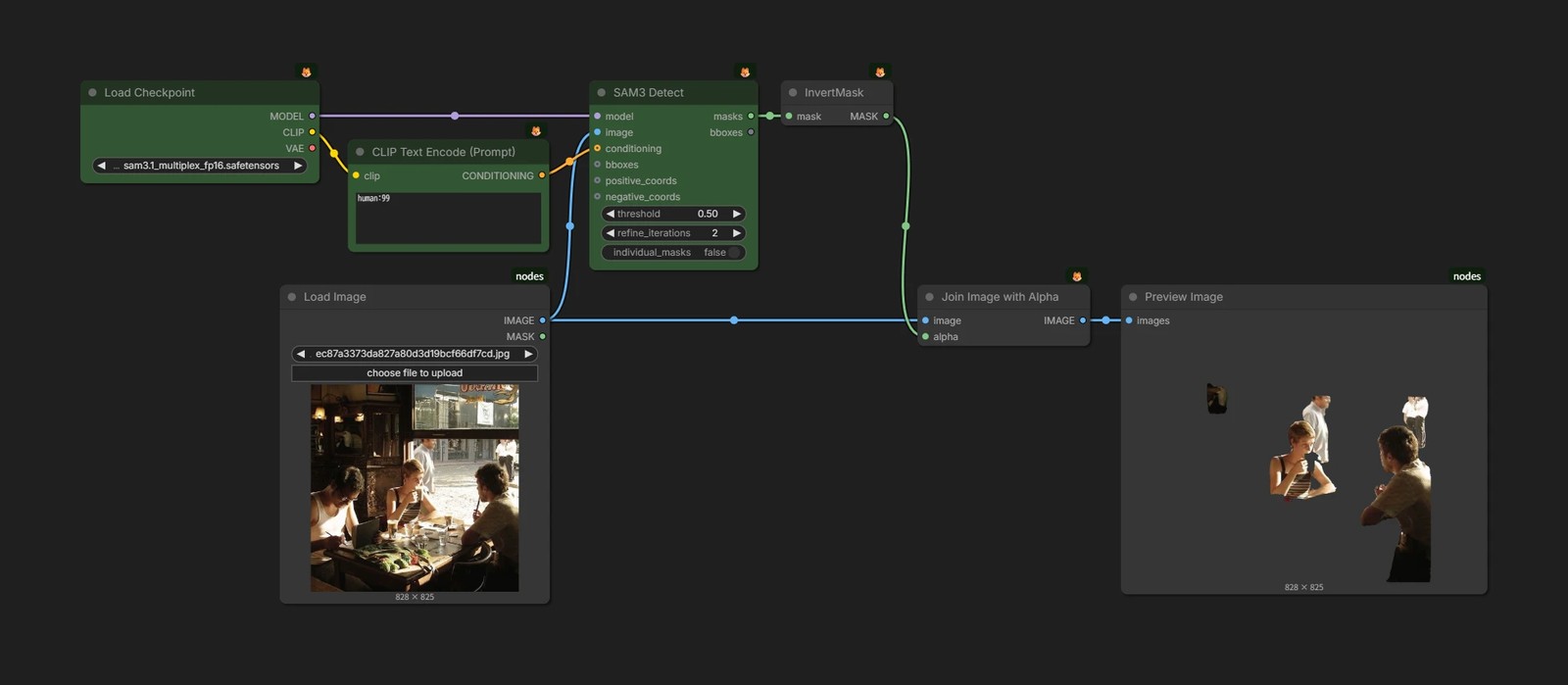
AI Mask Generation
Masks are often needed for inpainting and similar workflows, but drawing them by hand or preparing mask images every time is a lot of work. Above all, it cannot be automated.
However, there are not many techniques that can simply take "mask this part" and always produce a clean mask.
You need to think in terms of combining several AI techniques.
- Object Detection - Finds where the target is in the image.
- Segmentation - Cuts out the target shape as a mask.
- Matting - Handles the boundary between foreground and background in more detail.
For example, you might use object detection to find the target, then pass that result to segmentation to turn it into a mask.
Let's look at the main techniques.
Object Detection
As the name suggests, object detection identifies the position of a specific object in an image and outputs a rectangular area called a BBOX.
YOLO Family
YOLO is an extremely fast detection technique designed for real-time object detection.
Basically, one model is made for each type of object you want to detect, such as faces or hands. If there is no model for your target, you need to make one yourself, and it is not suitable when you want to detect many different categories at once.
In exchange, it is very light, so it is suitable when high-speed processing is needed.
Grounding DINO and Others
Grounding DINO detects objects specified by text and outputs BBOXes.
Unlike YOLO, you can specify objects with text such as "white dog" or "red car", so it is easy to use and can detect multiple objects at the same time.
VLM / MLLM
VLM / MLLM are LLMs with the ability to see images.
They can do many things, such as caption generation, and some of them can also perform object detection.
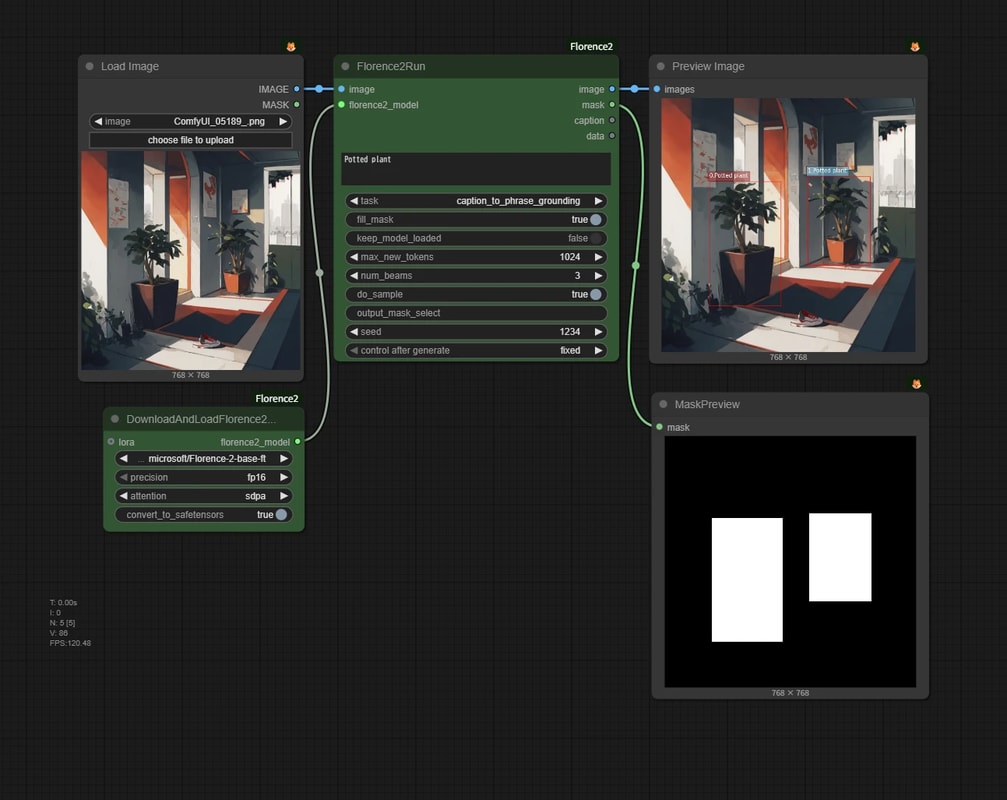
A representative older example is Florence-2.
It is slow, but because it has strong understanding ability, you can specify targets with complex text such as "the woman on the right side of the screen wearing a blue hat."
Matting
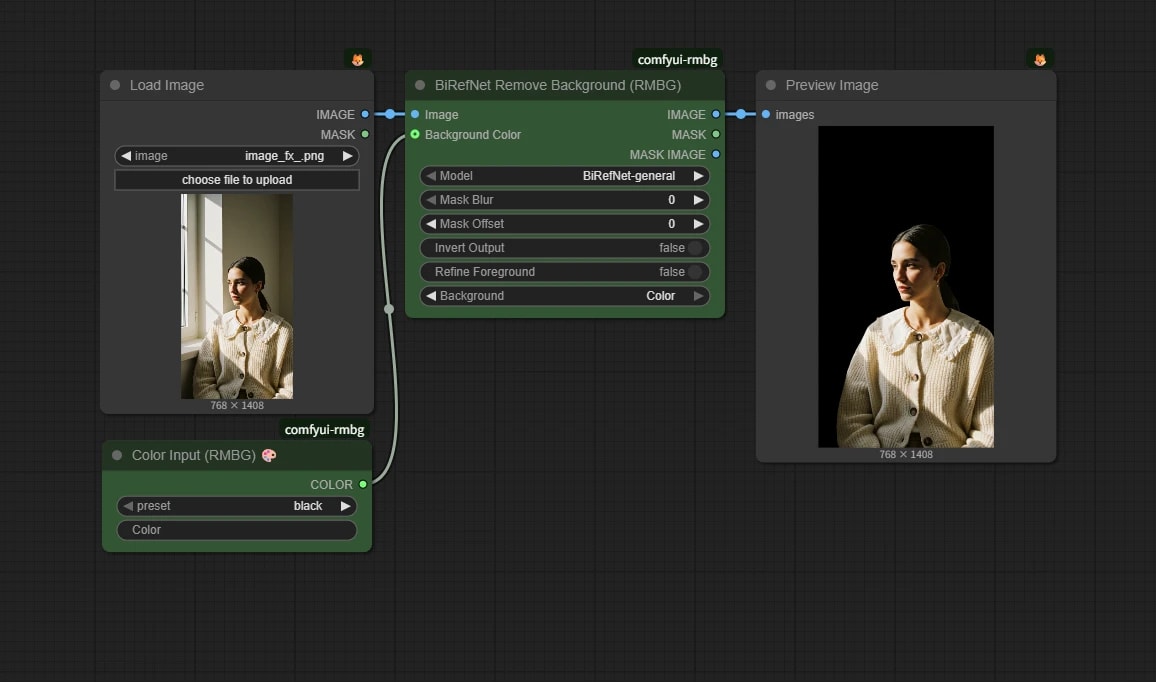
Many processes called "background removal" are matting.
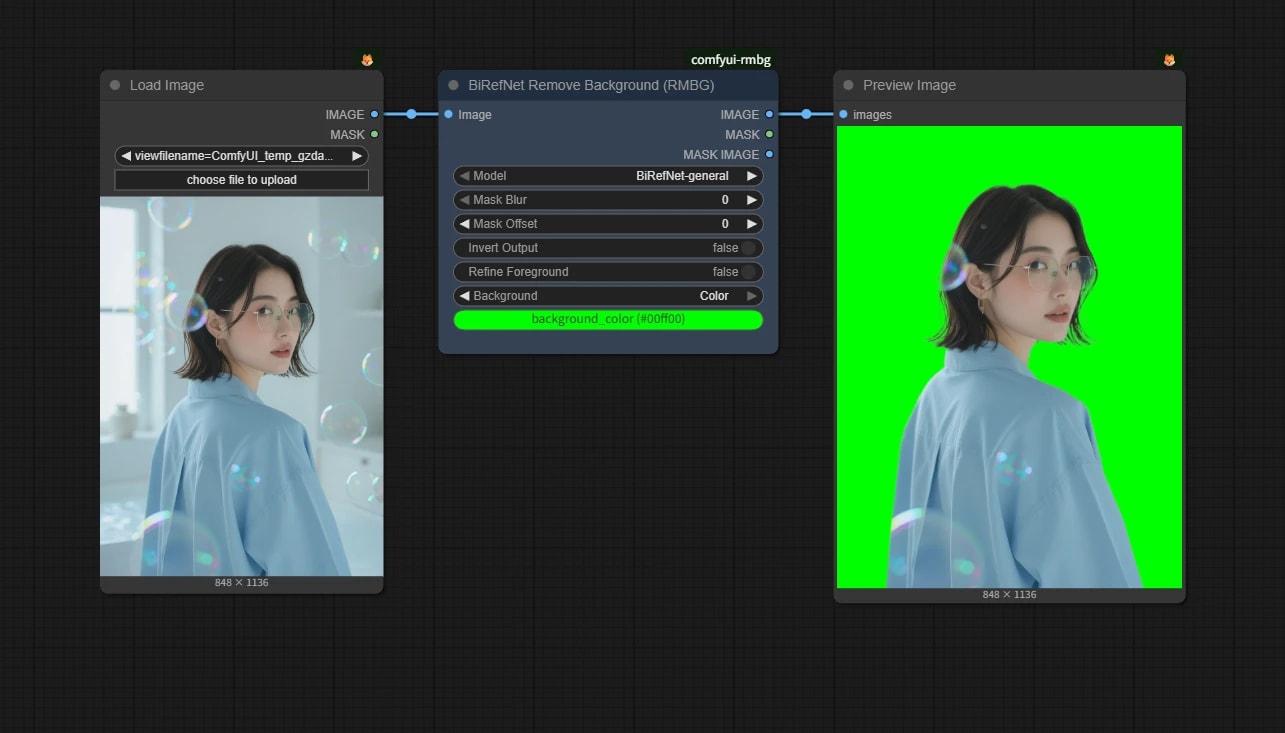
Matting separates the foreground from the background, and can handle fine boundaries such as hair and semi-transparent areas.
However, it is not for specifying and cutting out one particular object the way segmentation does.
BiRefNet
The detailed usage is covered on the BiRefNet page.
Segmentation
SAM (Segment Anything Model)
SAM is currently the most famous segmentation model.
It understands the shape of objects, so if you specify a car in a photo with text, points, or boxes, it can find the outline and turn it into a mask.
The current latest model is covered on the SAM 3 / 3.1 page.
Practical Examples
Let's combine the techniques above to generate masks for arbitrary text prompts or categories.
The workflows below were commonly used before SAM 3. If your goal is target-specified segmentation, start with SAM 3 / 3.1 now.
They remain here as references for understanding older workflows or reproducing the same setup in an existing environment.
Required Custom Nodes
These custom nodes may be needed to run the practical examples on this page.
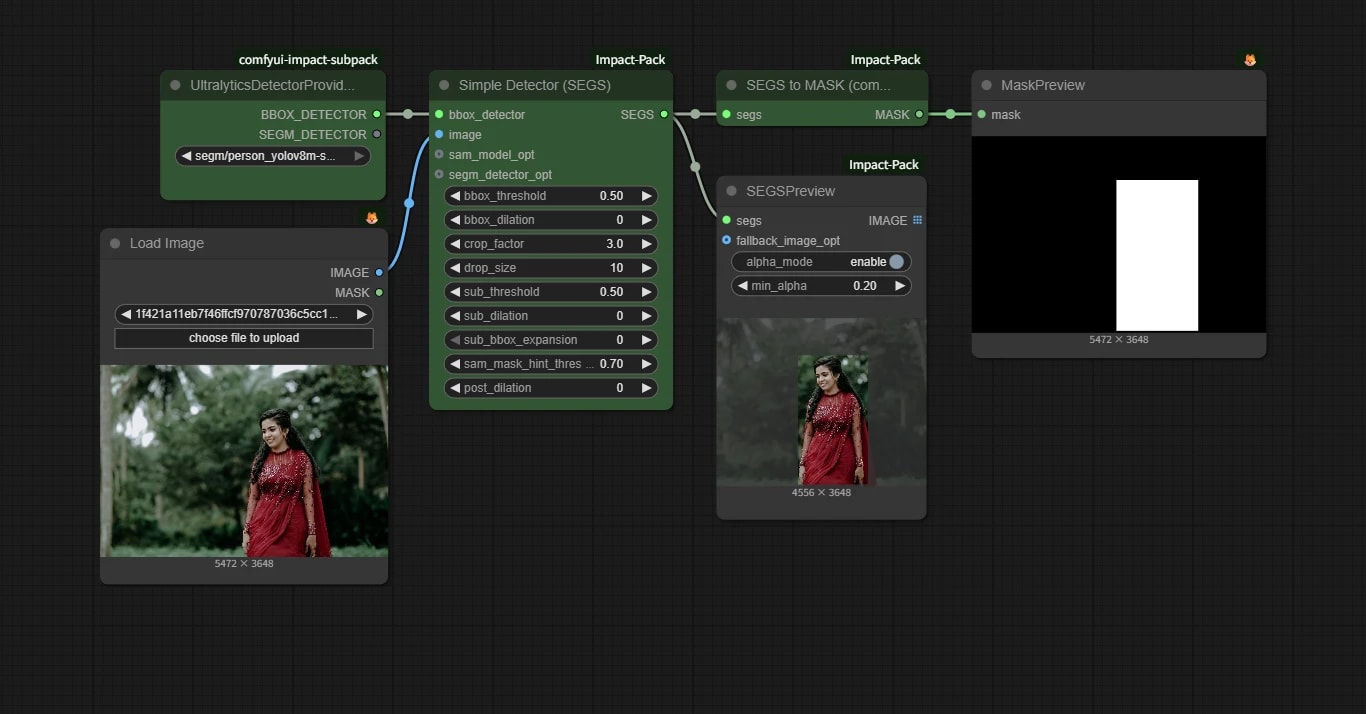
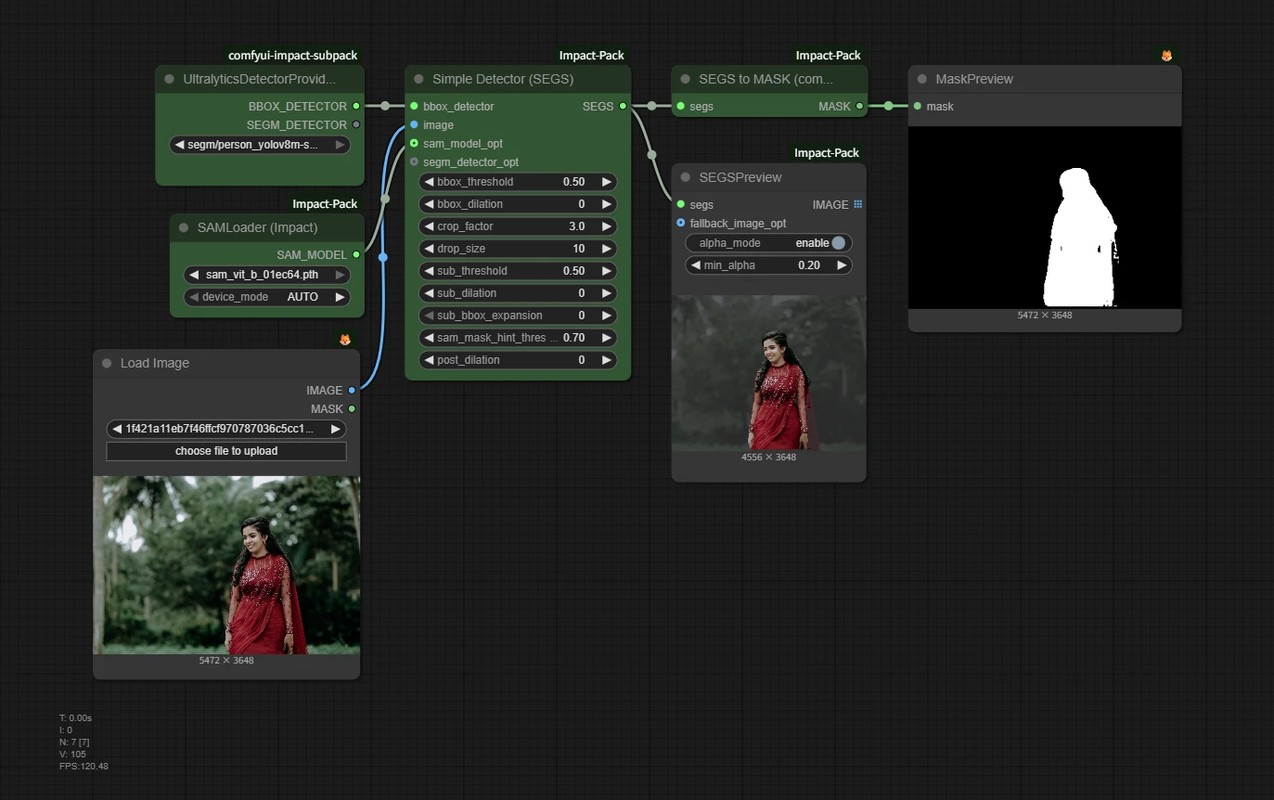
YOLO x SAM
{
  "id": "ffcc6c64-e535-4685-ab04-be903b4cdf3c",
  "revision": 0,
  "last_node_id": 8,
  "last_link_id": 6,
  "nodes": [
    {
      "id": 3,
      "type": "UltralyticsDetectorProvider",
      "pos": [
        -131.74129771892854,
        275.10463657117793
      ],
      "size": [
        225.47324988344883,
        100.20074983277442
      ],
      "flags": {},
      "order": 0,
      "mode": 0,
      "inputs": [],
      "outputs": [
        {
          "name": "BBOX_DETECTOR",
          "type": "BBOX_DETECTOR",
          "links": [
            2
          ]
        },
        {
          "name": "SEGM_DETECTOR",
          "type": "SEGM_DETECTOR",
          "links": null
        }
      ],
      "properties": {
        "cnr_id": "comfyui-impact-subpack",
        "ver": "1.3.5",
        "Node name for S&R": "UltralyticsDetectorProvider"
      },
      "widgets_values": [
        "segm/person_yolov8m-seg.pt"
      ],
      "color": "#232",
      "bgcolor": "#353"
    },
    {
      "id": 5,
      "type": "SegsToCombinedMask",
      "pos": [
        424.4134665014664,
        275.10463657117793
      ],
      "size": [
        211.851171875,
        26
      ],
      "flags": {},
      "order": 4,
      "mode": 0,
      "inputs": [
        {
          "name": "segs",
          "type": "SEGS",
          "link": 3
        }
      ],
      "outputs": [
        {
          "name": "MASK",
          "type": "MASK",
          "links": [
            4
          ]
        }
      ],
      "properties": {
        "cnr_id": "comfyui-impact-pack",
        "ver": "61bd8397a18e7e7668e6a24e95168967768c2bed",
        "Node name for S&R": "SegsToCombinedMask"
      },
      "color": "#232",
      "bgcolor": "#353"
    },
    {
      "id": 6,
      "type": "MaskPreview",
      "pos": [
        679.5682861699395,
        275.10463657117793
      ],
      "size": [
        294.93629499045346,
        258
      ],
      "flags": {},
      "order": 6,
      "mode": 0,
      "inputs": [
        {
          "name": "mask",
          "type": "MASK",
          "link": 4
        }
      ],
      "outputs": [],
      "properties": {
        "cnr_id": "comfy-core",
        "ver": "0.3.71",
        "Node name for S&R": "MaskPreview"
      },
      "widgets_values": []
    },
    {
      "id": 7,
      "type": "SEGSPreview",
      "pos": [
        424.5080547233428,
        380.8224702427784
      ],
      "size": [
        210,
        314
      ],
      "flags": {},
      "order": 5,
      "mode": 0,
      "inputs": [
        {
          "name": "segs",
          "type": "SEGS",
          "link": 5
        },
        {
          "name": "fallback_image_opt",
          "shape": 7,
          "type": "IMAGE",
          "link": null
        }
      ],
      "outputs": [
        {
          "name": "IMAGE",
          "shape": 6,
          "type": "IMAGE",
          "links": null
        }
      ],
      "properties": {
        "cnr_id": "comfyui-impact-pack",
        "ver": "61bd8397a18e7e7668e6a24e95168967768c2bed",
        "Node name for S&R": "SEGSPreview"
      },
      "widgets_values": [
        true,
        0.2
      ]
    },
    {
      "id": 8,
      "type": "SAMLoader",
      "pos": [
        -116.2680478354797,
        435.37734731069196
      ],
      "size": [
        210,
        82
      ],
      "flags": {},
      "order": 1,
      "mode": 0,
      "inputs": [],
      "outputs": [
        {
          "name": "SAM_MODEL",
          "type": "SAM_MODEL",
          "links": [
            6
          ]
        }
      ],
      "properties": {
        "cnr_id": "comfyui-impact-pack",
        "ver": "61bd8397a18e7e7668e6a24e95168967768c2bed",
        "Node name for S&R": "SAMLoader"
      },
      "widgets_values": [
        "sam_vit_b_01ec64.pth",
        "AUTO"
      ],
      "color": "#232",
      "bgcolor": "#353"
    },
    {
      "id": 2,
      "type": "LoadImage",
      "pos": [
        -199.16827143603965,
        581.4934848883244
      ],
      "size": [
        288.15658006702404,
        326
      ],
      "flags": {},
      "order": 2,
      "mode": 0,
      "inputs": [],
      "outputs": [
        {
          "name": "IMAGE",
          "type": "IMAGE",
          "links": [
            1
          ]
        },
        {
          "name": "MASK",
          "type": "MASK",
          "links": null
        }
      ],
      "properties": {
        "cnr_id": "comfy-core",
        "ver": "0.3.71",
        "Node name for S&R": "LoadImage"
      },
      "widgets_values": [
        "1f421a11eb7f46ffcf970787036c5cc1.jpg",
        "image"
      ]
    },
    {
      "id": 1,
      "type": "ImpactSimpleDetectorSEGS",
      "pos": [
        137.03559995799336,
        275.10463657117793
      ],
      "size": [
        244.07421875,
        310
      ],
      "flags": {},
      "order": 3,
      "mode": 0,
      "inputs": [
        {
          "name": "bbox_detector",
          "type": "BBOX_DETECTOR",
          "link": 2
        },
        {
          "name": "image",
          "type": "IMAGE",
          "link": 1
        },
        {
          "name": "sam_model_opt",
          "shape": 7,
          "type": "SAM_MODEL",
          "link": 6
        },
        {
          "name": "segm_detector_opt",
          "shape": 7,
          "type": "SEGM_DETECTOR",
          "link": null
        }
      ],
      "outputs": [
        {
          "name": "SEGS",
          "type": "SEGS",
          "links": [
            3,
            5
          ]
        }
      ],
      "properties": {
        "cnr_id": "comfyui-impact-pack",
        "ver": "61bd8397a18e7e7668e6a24e95168967768c2bed",
        "Node name for S&R": "ImpactSimpleDetectorSEGS"
      },
      "widgets_values": [
        0.5,
        0,
        3,
        10,
        0.5,
        0,
        0,
        0.7,
        0
      ],
      "color": "#232",
      "bgcolor": "#353"
    }
  ],
  "links": [
    [
      1,
      2,
      0,
      1,
      1,
      "IMAGE"
    ],
    [
      2,
      3,
      0,
      1,
      0,
      "BBOX_DETECTOR"
    ],
    [
      3,
      1,
      0,
      5,
      0,
      "SEGS"
    ],
    [
      4,
      5,
      0,
      6,
      0,
      "MASK"
    ],
    [
      5,
      1,
      0,
      7,
      0,
      "SEGS"
    ],
    [
      6,
      8,
      0,
      1,
      2,
      "SAM_MODEL"
    ]
  ],
  "groups": [],
  "config": {},
  "extra": {
    "ds": {
      "scale": 0.839054528882405,
      "offset": [
        431.4600310048111,
        -114.3219362287694
      ]
    },
    "frontendVersion": "1.33.8",
    "VHS_latentpreview": false,
    "VHS_latentpreviewrate": 0,
    "VHS_MetadataImage": true,
    "VHS_KeepIntermediate": true
  },
  "version": 0.4
}
This combines fast face detection with YOLO and the original SAM.
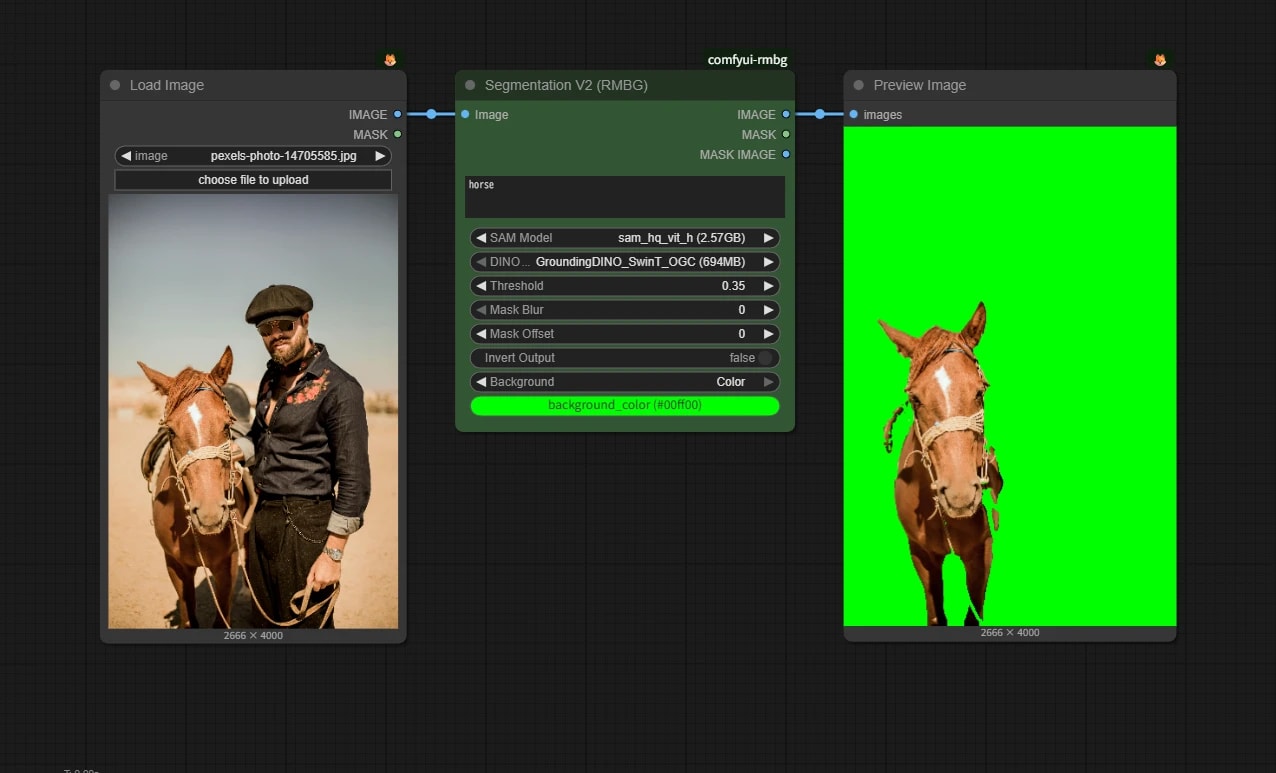
Grounding DINO x SAM
grounding_dino_hq_sam.json
{
  "id": "45213769-31e7-40a4-9027-26c67d437c51",
  "revision": 0,
  "last_node_id": 6,
  "last_link_id": 4,
  "nodes": [
    {
      "id": 4,
      "type": "LoadImage",
      "pos": [
        -84.57715485740746,
        436.65995789100543
      ],
      "size": [
        306.56906795083313,
        543.6425774433825
      ],
      "flags": {},
      "order": 0,
      "mode": 0,
      "inputs": [],
      "outputs": [
        {
          "name": "IMAGE",
          "type": "IMAGE",
          "links": [
            1
          ]
        },
        {
          "name": "MASK",
          "type": "MASK",
          "links": null
        }
      ],
      "properties": {
        "cnr_id": "comfy-core",
        "ver": "0.3.71",
        "Node name for S&R": "LoadImage"
      },
      "widgets_values": [
        "pexels-photo-14705585.jpg",
        "image"
      ]
    },
    {
      "id": 2,
      "type": "SegmentV2",
      "pos": [
        270.53229781565096,
        436.65995789100543
      ],
      "size": [
        340,
        332
      ],
      "flags": {},
      "order": 1,
      "mode": 0,
      "inputs": [
        {
          "name": "image",
          "type": "IMAGE",
          "link": 1
        }
      ],
      "outputs": [
        {
          "name": "IMAGE",
          "type": "IMAGE",
          "links": [
            3
          ]
        },
        {
          "name": "MASK",
          "type": "MASK",
          "links": null
        },
        {
          "name": "MASK_IMAGE",
          "type": "IMAGE",
          "links": null
        }
      ],
      "properties": {
        "cnr_id": "comfyui-rmbg",
        "ver": "2.9.4",
        "Node name for S&R": "SegmentV2"
      },
      "widgets_values": [
        "horse",
        "sam_hq_vit_h (2.57GB)",
        "GroundingDINO_SwinT_OGC (694MB)",
        0.35,
        0,
        0,
        false,
        "Color",
        "#00ff00"
      ],
      "color": "#232",
      "bgcolor": "#353"
    },
    {
      "id": 5,
      "type": "PreviewImage",
      "pos": [
        659.0726825378763,
        436.65995789100543
      ],
      "size": [
        332.83609638042526,
        541.6899599010097
      ],
      "flags": {},
      "order": 2,
      "mode": 0,
      "inputs": [
        {
          "name": "images",
          "type": "IMAGE",
          "link": 3
        }
      ],
      "outputs": [],
      "properties": {
        "cnr_id": "comfy-core",
        "ver": "0.3.71",
        "Node name for S&R": "PreviewImage"
      },
      "widgets_values": []
    }
  ],
  "links": [
    [
      1,
      4,
      0,
      2,
      0,
      "IMAGE"
    ],
    [
      3,
      2,
      0,
      5,
      0,
      "IMAGE"
    ]
  ],
  "groups": [],
  "config": {},
  "extra": {
    "ds": {
      "scale": 0.7627768444385543,
      "offset": [
        184.57715485740746,
        -336.65995789100543
      ]
    },
    "frontendVersion": "1.33.8",
    "VHS_latentpreview": false,
    "VHS_latentpreviewrate": 0,
    "VHS_MetadataImage": true,
    "VHS_KeepIntermediate": true
  },
  "version": 0.4
}
This combines Grounding DINO with HQ-SAM, an improved version of SAM.
It can specify targets by text and generate high-precision masks, so it was one of the most commonly used combinations.
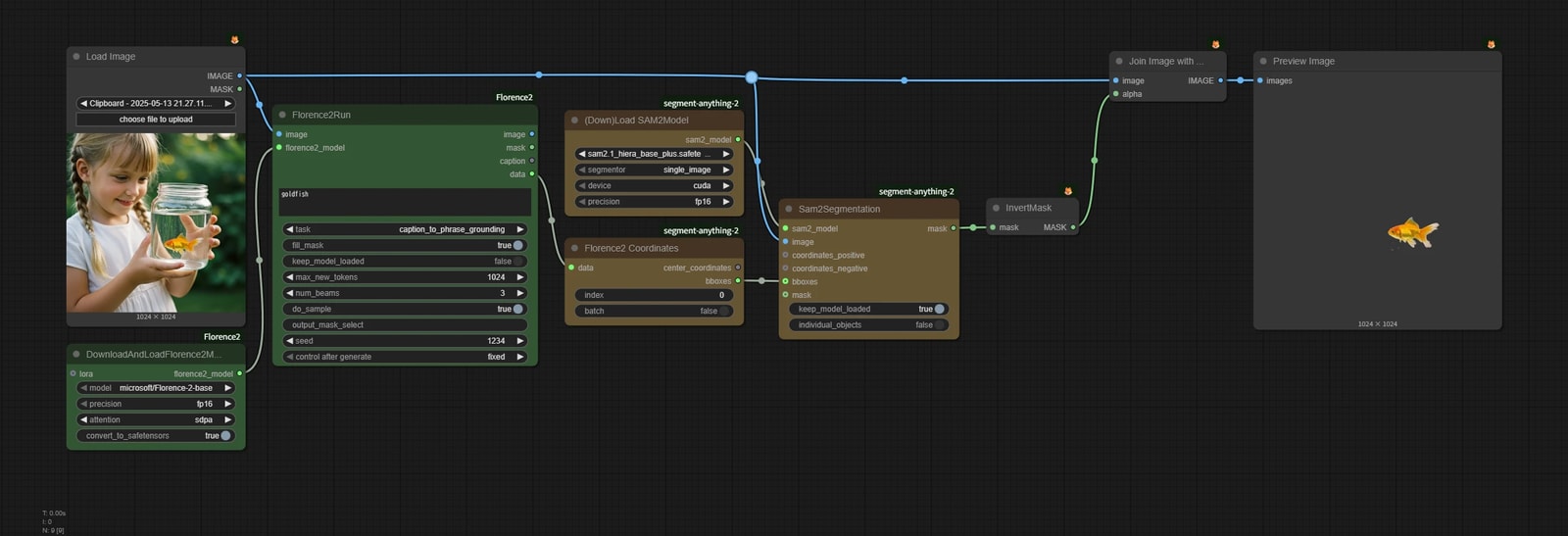
Florence2 x SAM2
{
  "id": "b13968f1-cfe5-4646-9f22-ac07831aae2b",
  "revision": 0,
  "last_node_id": 33,
  "last_link_id": 41,
  "nodes": [
    {
      "id": 27,
      "type": "DownloadAndLoadFlorence2Model",
      "pos": [
        797.5498046875,
        435.3081359863281
      ],
      "size": [
        270,
        130
      ],
      "flags": {},
      "order": 0,
      "mode": 0,
      "inputs": [
        {
          "name": "lora",
          "shape": 7,
          "type": "PEFTLORA",
          "link": null
        }
      ],
      "outputs": [
        {
          "name": "florence2_model",
          "type": "FL2MODEL",
          "links": [
            28
          ]
        }
      ],
      "properties": {
        "cnr_id": "comfyui-florence2",
        "ver": "de485b65b3e1b9b887ab494afa236dff4bef9a7e",
        "Node name for S&R": "DownloadAndLoadFlorence2Model"
      },
      "widgets_values": [
        "microsoft/Florence-2-base",
        "fp16",
        "sdpa",
        true
      ],
      "color": "#232",
      "bgcolor": "#353"
    },
    {
      "id": 30,
      "type": "Florence2toCoordinates",
      "pos": [
        1548.1920166015625,
        275.46484375
      ],
      "size": [
        270,
        102
      ],
      "flags": {},
      "order": 4,
      "mode": 0,
      "inputs": [
        {
          "name": "data",
          "type": "JSON",
          "link": 36
        }
      ],
      "outputs": [
        {
          "name": "center_coordinates",
          "type": "STRING",
          "links": null
        },
        {
          "name": "bboxes",
          "type": "BBOX",
          "links": [
            37
          ]
        }
      ],
      "properties": {
        "cnr_id": "ComfyUI-segment-anything-2",
        "ver": "c59676b008a76237002926f684d0ca3a9b29ac54",
        "Node name for S&R": "Florence2toCoordinates"
      },
      "widgets_values": [
        "0",
        false
      ],
      "color": "#432",
      "bgcolor": "#653"
    },
    {
      "id": 16,
      "type": "LoadImage",
      "pos": [
        797.5498046875,
        -13.30300235748291
      ],
      "size": [
        270,
        392.65997314453125
      ],
      "flags": {},
      "order": 1,
      "mode": 0,
      "inputs": [],
      "outputs": [
        {
          "name": "IMAGE",
          "type": "IMAGE",
          "links": [
            26,
            34,
            41
          ]
        },
        {
          "name": "MASK",
          "type": "MASK",
          "links": null
        }
      ],
      "properties": {
        "cnr_id": "comfy-core",
        "ver": "0.3.39",
        "Node name for S&R": "LoadImage"
      },
      "widgets_values": [
        "Clipboard - 2025-05-13 21.27.11.png",
        "image"
      ]
    },
    {
      "id": 29,
      "type": "InvertMask",
      "pos": [
        2183.08349609375,
        215.1739044189453
      ],
      "size": [
        140,
        26
      ],
      "flags": {},
      "order": 6,
      "mode": 0,
      "inputs": [
        {
          "name": "mask",
          "type": "MASK",
          "link": 38
        }
      ],
      "outputs": [
        {
          "name": "MASK",
          "type": "MASK",
          "links": [
            35
          ]
        }
      ],
      "properties": {
        "cnr_id": "comfy-core",
        "ver": "0.3.39",
        "Node name for S&R": "InvertMask"
      },
      "widgets_values": []
    },
    {
      "id": 23,
      "type": "PreviewImage",
      "pos": [
        2585.65771484375,
        -6.269532203674316
      ],
      "size": [
        374.6875305175781,
        390.1878356933594
      ],
      "flags": {},
      "order": 8,
      "mode": 0,
      "inputs": [
        {
          "name": "images",
          "type": "IMAGE",
          "link": 32
        }
      ],
      "outputs": [],
      "properties": {
        "cnr_id": "comfy-core",
        "ver": "0.3.39",
        "Node name for S&R": "PreviewImage"
      },
      "widgets_values": []
    },
    {
      "id": 32,
      "type": "Sam2Segmentation",
      "pos": [
        1870.6756591796875,
        216.38262939453125
      ],
      "size": [
        272.087890625,
        182
      ],
      "flags": {},
      "order": 5,
      "mode": 0,
      "inputs": [
        {
          "name": "sam2_model",
          "type": "SAM2MODEL",
          "link": 40
        },
        {
          "name": "image",
          "type": "IMAGE",
          "link": 41
        },
        {
          "name": "coordinates_positive",
          "shape": 7,
          "type": "STRING",
          "link": null
        },
        {
          "name": "coordinates_negative",
          "shape": 7,
          "type": "STRING",
          "link": null
        },
        {
          "name": "bboxes",
          "shape": 7,
          "type": "BBOX",
          "link": 37
        },
        {
          "name": "mask",
          "shape": 7,
          "type": "MASK",
          "link": null
        }
      ],
      "outputs": [
        {
          "name": "mask",
          "type": "MASK",
          "links": [
            38
          ]
        }
      ],
      "properties": {
        "cnr_id": "ComfyUI-segment-anything-2",
        "ver": "c59676b008a76237002926f684d0ca3a9b29ac54",
        "Node name for S&R": "Sam2Segmentation"
      },
      "widgets_values": [
        true,
        false
      ],
      "color": "#432",
      "bgcolor": "#653"
    },
    {
      "id": 28,
      "type": "JoinImageWithAlpha",
      "pos": [
        2368.4716796875,
        -6.269532203674316
      ],
      "size": [
        176.86484375,
        46
      ],
      "flags": {},
      "order": 7,
      "mode": 0,
      "inputs": [
        {
          "name": "image",
          "type": "IMAGE",
          "link": 34
        },
        {
          "name": "alpha",
          "type": "MASK",
          "link": 35
        }
      ],
      "outputs": [
        {
          "name": "IMAGE",
          "type": "IMAGE",
          "links": [
            32
          ]
        }
      ],
      "properties": {
        "cnr_id": "comfy-core",
        "ver": "0.3.39",
        "Node name for S&R": "JoinImageWithAlpha"
      },
      "widgets_values": []
    },
    {
      "id": 33,
      "type": "DownloadAndLoadSAM2Model",
      "pos": [
        1548.1920166015625,
        82.7560043334961
      ],
      "size": [
        270,
        130
      ],
      "flags": {},
      "order": 2,
      "mode": 0,
      "inputs": [],
      "outputs": [
        {
          "name": "sam2_model",
          "type": "SAM2MODEL",
          "links": [
            40
          ]
        }
      ],
      "properties": {
        "cnr_id": "ComfyUI-segment-anything-2",
        "ver": "c59676b008a76237002926f684d0ca3a9b29ac54",
        "Node name for S&R": "DownloadAndLoadSAM2Model"
      },
      "widgets_values": [
        "sam2.1_hiera_base_plus.safetensors",
        "single_image",
        "cuda",
        "fp16"
      ],
      "color": "#432",
      "bgcolor": "#653"
    },
    {
      "id": 25,
      "type": "Florence2Run",
      "pos": [
        1107.8709716796875,
        74.4581298828125
      ],
      "size": [
        400,
        364
      ],
      "flags": {},
      "order": 3,
      "mode": 0,
      "inputs": [
        {
          "name": "image",
          "type": "IMAGE",
          "link": 26
        },
        {
          "name": "florence2_model",
          "type": "FL2MODEL",
          "link": 28
        }
      ],
      "outputs": [
        {
          "name": "image",
          "type": "IMAGE",
          "links": []
        },
        {
          "name": "mask",
          "type": "MASK",
          "links": []
        },
        {
          "name": "caption",
          "type": "STRING",
          "links": null
        },
        {
          "name": "data",
          "type": "JSON",
          "links": [
            36
          ]
        }
      ],
      "properties": {
        "cnr_id": "comfyui-florence2",
        "ver": "de485b65b3e1b9b887ab494afa236dff4bef9a7e",
        "Node name for S&R": "Florence2Run"
      },
      "widgets_values": [
        "goldfish",
        "caption_to_phrase_grounding",
        true,
        false,
        1024,
        3,
        true,
        "",
        1234,
        "fixed"
      ],
      "color": "#232",
      "bgcolor": "#353"
    }
  ],
  "links": [
    [
      26,
      16,
      0,
      25,
      0,
      "IMAGE"
    ],
    [
      28,
      27,
      0,
      25,
      1,
      "FL2MODEL"
    ],
    [
      32,
      28,
      0,
      23,
      0,
      "IMAGE"
    ],
    [
      34,
      16,
      0,
      28,
      0,
      "IMAGE"
    ],
    [
      35,
      29,
      0,
      28,
      1,
      "MASK"
    ],
    [
      36,
      25,
      3,
      30,
      0,
      "JSON"
    ],
    [
      37,
      30,
      1,
      32,
      4,
      "BBOX"
    ],
    [
      38,
      32,
      0,
      29,
      0,
      "MASK"
    ],
    [
      40,
      33,
      0,
      32,
      0,
      "SAM2MODEL"
    ],
    [
      41,
      16,
      0,
      32,
      1,
      "IMAGE"
    ]
  ],
  "groups": [],
  "config": {},
  "extra": {
    "ds": {
      "scale": 0.620921323059155,
      "offset": [
        -697.5498046875,
        113.30300235748291
      ]
    },
    "reroutes": [
      {
        "id": 1,
        "pos": [
          1829.7442626953125,
          3.2779242992401123
        ],
        "linkIds": [
          34,
          41
        ]
      }
    ],
    "linkExtensions": [
      {
        "id": 34,
        "parentId": 1
      },
      {
        "id": 41,
        "parentId": 1
      }
    ],
    "frontendVersion": "1.33.8",
    "VHS_latentpreview": false,
    "VHS_latentpreviewrate": 0,
    "VHS_MetadataImage": true,
    "VHS_KeepIntermediate": true
  },
  "version": 0.4
}
This combines Florence2 and SAM2.1.
For easy targets such as people or animals, many methods work fine. But when you want to specify a complex condition like "a man wearing sunglasses" or "a cat lying under a tree", this kind of LLM-based model is useful.
SAM 3 x BiRefNet
{
  "id": "5231bbde-3d9e-483d-9963-63165fedc646",
  "revision": 0,
  "last_node_id": 12,
  "last_link_id": 18,
  "nodes": [
    {
      "id": 2,
      "type": "PreviewImage",
      "pos": [
        1836.5379900055684,
        293.7408968602474
      ],
      "size": [
        554.9600255276209,
        422.8923553539689
      ],
      "flags": {},
      "order": 4,
      "mode": 0,
      "inputs": [
        {
          "name": "images",
          "type": "IMAGE",
          "link": 17
        }
      ],
      "outputs": [],
      "properties": {
        "cnr_id": "comfy-core",
        "ver": "0.3.71",
        "Node name for S&R": "PreviewImage"
      },
      "widgets_values": []
    },
    {
      "id": 1,
      "type": "LoadImage",
      "pos": [
        477.2842309638515,
        293.7408968602474
      ],
      "size": [
        526.1926943110356,
        491.5335516952887
      ],
      "flags": {},
      "order": 0,
      "mode": 0,
      "inputs": [],
      "outputs": [
        {
          "name": "IMAGE",
          "type": "IMAGE",
          "links": [
            18
          ]
        },
        {
          "name": "MASK",
          "type": "MASK",
          "links": null
        }
      ],
      "properties": {
        "cnr_id": "comfy-core",
        "ver": "0.3.71",
        "Node name for S&R": "LoadImage"
      },
      "widgets_values": [
        "pasted/image (35).png",
        "image"
      ]
    },
    {
      "id": 11,
      "type": "BiRefNetRMBG",
      "pos": [
        1445.5176350953413,
        293.7408968602474
      ],
      "size": [
        340,
        254
      ],
      "flags": {},
      "order": 3,
      "mode": 0,
      "inputs": [
        {
          "name": "image",
          "type": "IMAGE",
          "link": 16
        }
      ],
      "outputs": [
        {
          "name": "IMAGE",
          "type": "IMAGE",
          "links": [
            17
          ]
        },
        {
          "name": "MASK",
          "type": "MASK",
          "links": null
        },
        {
          "name": "MASK_IMAGE",
          "type": "IMAGE",
          "links": null
        }
      ],
      "properties": {
        "cnr_id": "comfyui-rmbg",
        "ver": "2.9.4",
        "Node name for S&R": "BiRefNetRMBG"
      },
      "widgets_values": [
        "BiRefNet-general",
        0,
        0,
        false,
        false,
        "Alpha",
        "#222222"
      ],
      "color": "#323",
      "bgcolor": "#535"
    },
    {
      "id": 5,
      "type": "PreviewImage",
      "pos": [
        1448.15746204173,
        611.2211523676546
      ],
      "size": [
        332.392016078781,
        258
      ],
      "flags": {},
      "order": 2,
      "mode": 0,
      "inputs": [
        {
          "name": "images",
          "type": "IMAGE",
          "link": 4
        }
      ],
      "outputs": [],
      "properties": {
        "cnr_id": "comfy-core",
        "ver": "0.3.71",
        "Node name for S&R": "PreviewImage"
      },
      "widgets_values": []
    },
    {
      "id": 4,
      "type": "SAM3Segment",
      "pos": [
        1054.497280185114,
        293.7408968602474
      ],
      "size": [
        340,
        332
      ],
      "flags": {},
      "order": 1,
      "mode": 0,
      "inputs": [
        {
          "name": "image",
          "type": "IMAGE",
          "link": 18
        }
      ],
      "outputs": [
        {
          "name": "IMAGE",
          "type": "IMAGE",
          "links": [
            4,
            16
          ]
        },
        {
          "name": "MASK",
          "type": "MASK",
          "links": []
        },
        {
          "name": "MASK_IMAGE",
          "type": "IMAGE",
          "links": null
        }
      ],
      "properties": {
        "cnr_id": "comfyui-rmbg",
        "ver": "2.9.4",
        "Node name for S&R": "SAM3Segment"
      },
      "widgets_values": [
        "the woman on the right",
        "sam3",
        "Auto",
        0.5,
        0,
        7,
        false,
        "Color",
        "#00ff00"
      ],
      "color": "#432",
      "bgcolor": "#653"
    }
  ],
  "links": [
    [
      4,
      4,
      0,
      5,
      0,
      "IMAGE"
    ],
    [
      16,
      4,
      0,
      11,
      0,
      "IMAGE"
    ],
    [
      17,
      11,
      0,
      2,
      0,
      "IMAGE"
    ],
    [
      18,
      1,
      0,
      4,
      0,
      "IMAGE"
    ]
  ],
  "groups": [],
  "config": {},
  "extra": {
    "ds": {
      "scale": 0.8390545288824087,
      "offset": [
        -377.2842309638515,
        -193.7408968602474
      ]
    },
    "frontendVersion": "1.33.8",
    "VHS_latentpreview": false,
    "VHS_latentpreviewrate": 0,
    "VHS_MetadataImage": true,
    "VHS_KeepIntermediate": true
  },
  "version": 0.4
}
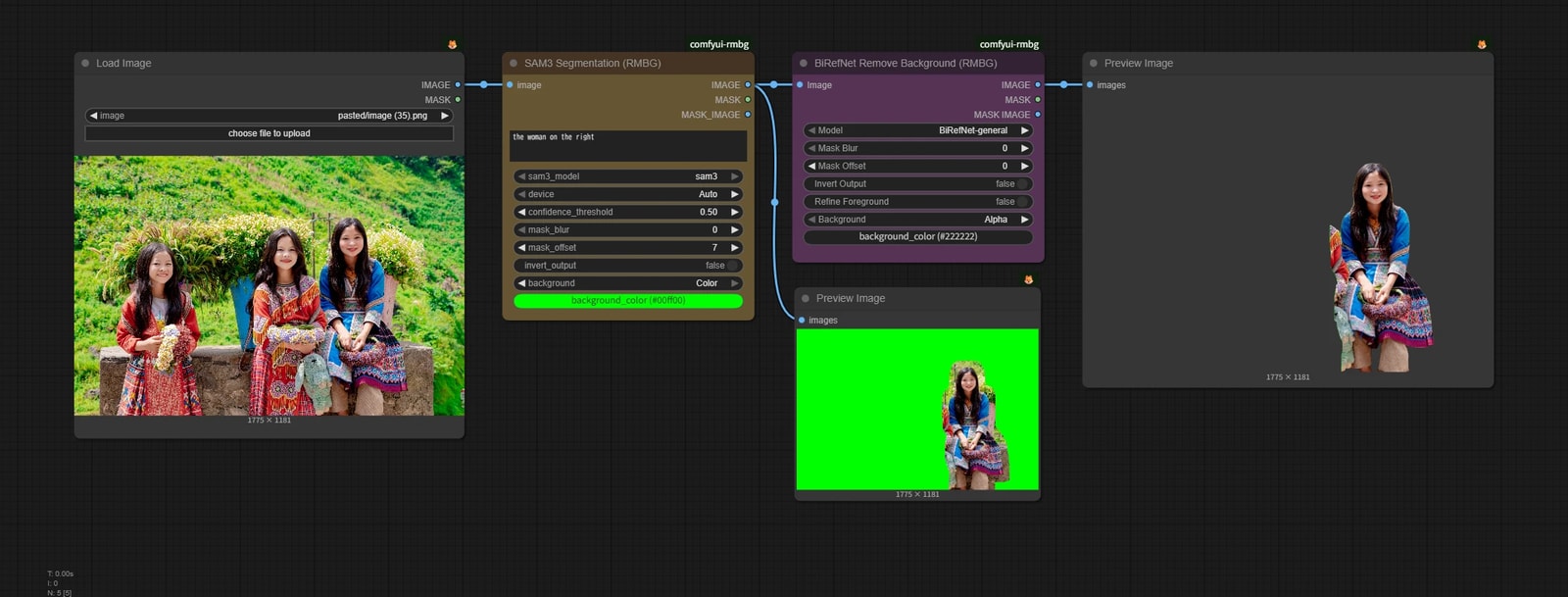
Segmentation is for distinguishing objects, not for fine cutouts.
By contrast, matting can handle fine details like hair and semi-transparent objects like glass.
Combining them lets you take advantage of both.