テキストの操作
ComfyUIでは、主にプロンプトとしてテキストを扱います。
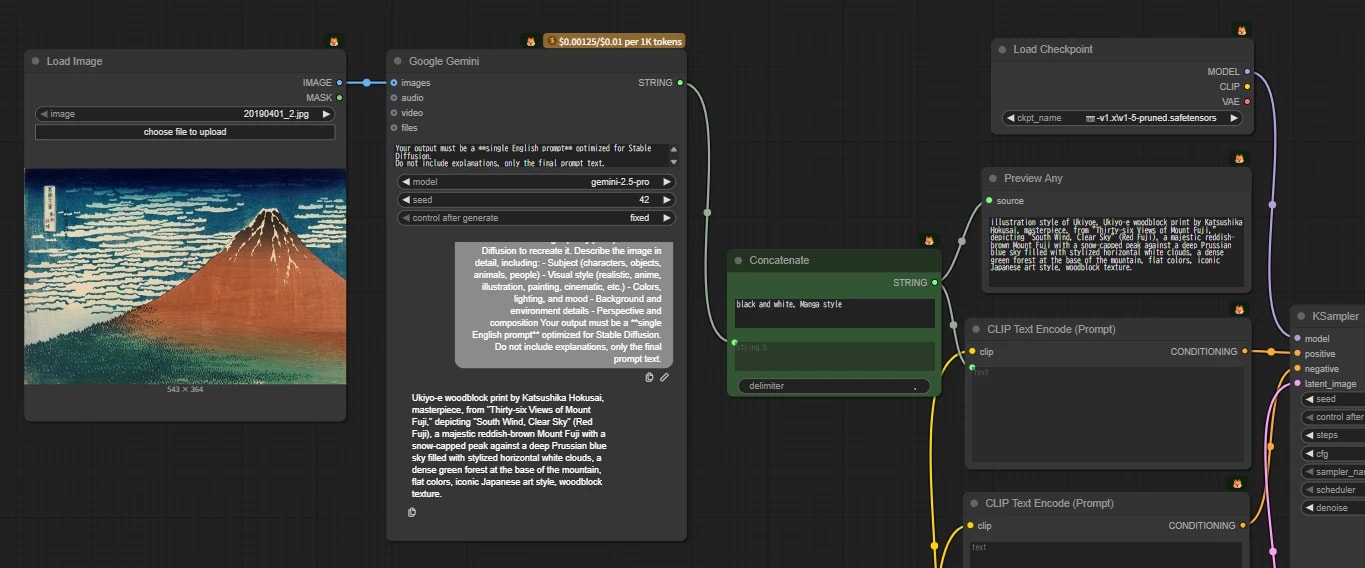
文字列の一部を置き換えたり、LLMが作成したプロンプトにトリガーワードをくっつけたりと、いくつかの操作を自動化することでワークフローがより便利になります。
stringとは?
プログラミングの世界では、テキストを数字などと区別するために string(ストリング) と呼びます。
apple → 5文字のstring123 → 数字に見えるけど、実際は文字として扱うstring" " (空白) → 見えないけど、1文字のstring
基本的な操作ノード
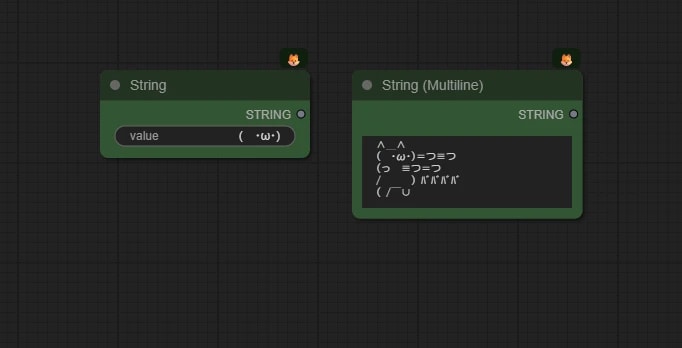
String ノード (文字入力)
文字列を入力する基本的なノードです。
String (Multiline) ノードを使うと、改行を含むテキストを入力できます。
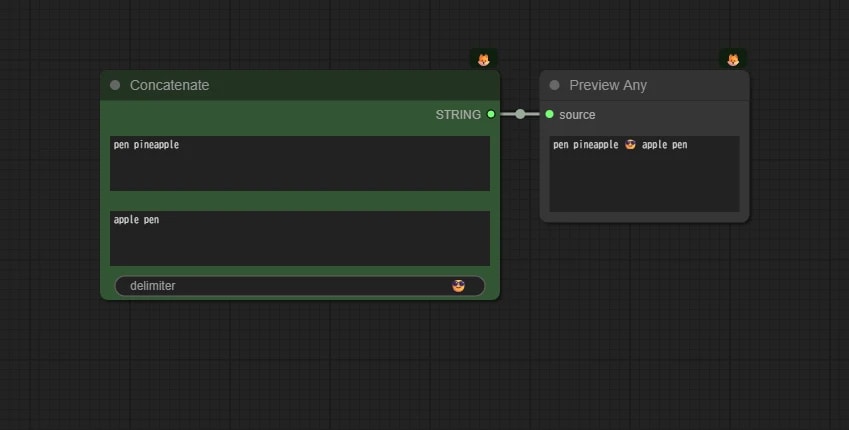
Concatenate ノード (文字結合)
複数のstringをつなげてひとつにまとめます。
(例:apple + pen → applepen)
delimiter は区切り文字のことです。好きなものが使用できます(カンマや改行など)。
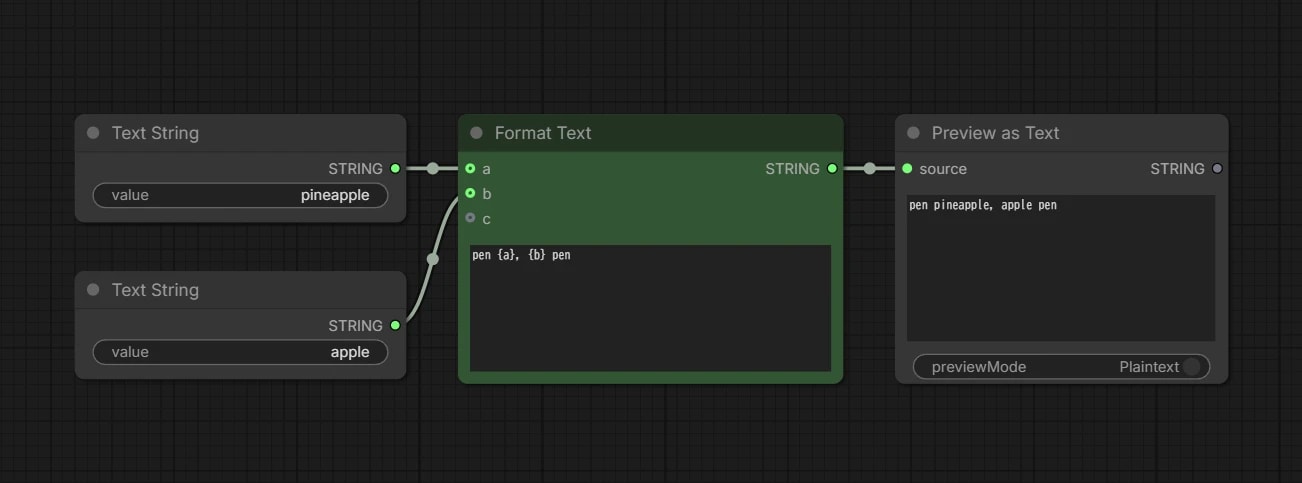
Format Text ノード
{
  "id": "e7ac41a3-a6f4-4793-b5e9-ff15f104192c",
  "revision": 0,
  "last_node_id": 4,
  "last_link_id": 5,
  "nodes": [
    {
      "id": 3,
      "type": "PrimitiveString",
      "pos": [
        1120.168561094031,
        268.47862109943014
      ],
      "size": [
        270,
        58
      ],
      "flags": {},
      "order": 0,
      "mode": 0,
      "inputs": [],
      "outputs": [
        {
          "name": "STRING",
          "type": "STRING",
          "links": [
            4
          ]
        }
      ],
      "properties": {
        "cnr_id": "comfy-core",
        "ver": "0.22.0",
        "Node name for S&R": "PrimitiveString"
      },
      "widgets_values": [
        "apple"
      ]
    },
    {
      "id": 2,
      "type": "PrimitiveString",
      "pos": [
        1120.168561094031,
        140.8191716363399
      ],
      "size": [
        270,
        58
      ],
      "flags": {},
      "order": 1,
      "mode": 0,
      "inputs": [],
      "outputs": [
        {
          "name": "STRING",
          "type": "STRING",
          "links": [
            2
          ]
        }
      ],
      "properties": {
        "cnr_id": "comfy-core",
        "ver": "0.22.0",
        "Node name for S&R": "PrimitiveString"
      },
      "widgets_values": [
        "pineapple"
      ]
    },
    {
      "id": 4,
      "type": "PreviewAny",
      "pos": [
        1787.9218052801998,
        140.8191716363399
      ],
      "size": [
        271.4220745373427,
        189.4176425797109
      ],
      "flags": {},
      "order": 3,
      "mode": 0,
      "inputs": [
        {
          "name": "source",
          "type": "*",
          "link": 5
        }
      ],
      "outputs": [
        {
          "name": "STRING",
          "type": "STRING",
          "links": null
        }
      ],
      "properties": {
        "cnr_id": "comfy-core",
        "ver": "0.22.0",
        "Node name for S&R": "PreviewAny"
      },
      "widgets_values": [
        null,
        null,
        null
      ]
    },
    {
      "id": 1,
      "type": "StringFormat",
      "pos": [
        1432.1886403621404,
        140.8191716363399
      ],
      "size": [
        313.71308564995,
        189.4176425797109
      ],
      "flags": {},
      "order": 2,
      "mode": 0,
      "inputs": [
        {
          "label": "a",
          "name": "values.a",
          "shape": 7,
          "type": "*",
          "link": 2
        },
        {
          "label": "b",
          "name": "values.b",
          "shape": 7,
          "type": "*",
          "link": 4
        },
        {
          "label": "c",
          "name": "values.c",
          "shape": 7,
          "type": "*",
          "link": null
        }
      ],
      "outputs": [
        {
          "name": "STRING",
          "type": "STRING",
          "links": [
            5
          ]
        }
      ],
      "properties": {
        "cnr_id": "comfy-core",
        "ver": "0.22.0",
        "Node name for S&R": "StringFormat"
      },
      "widgets_values": [
        "pen {a}, {b} pen"
      ],
      "color": "#232",
      "bgcolor": "#353"
    }
  ],
  "links": [
    [
      2,
      2,
      0,
      1,
      0,
      "STRING"
    ],
    [
      4,
      3,
      0,
      1,
      1,
      "STRING"
    ],
    [
      5,
      1,
      0,
      4,
      0,
      "STRING"
    ]
  ],
  "groups": [],
  "config": {},
  "extra": {
    "ds": {
      "scale": 1.228459735736726,
      "offset": [
        -842.0589322707493,
        177.57736449068497
      ]
    },
    "frontendVersion": "1.44.19"
  },
  "version": 0.4
}
文章のひな形を作り、そこに別のstringを差し込むノードです。
Concatenate よりも、柔軟にテキストを組み合わせられます。
たとえば a に apple、b に red を接続し、format に {a} is {b}. と書くと、apple is red. のような文字列を作れます。
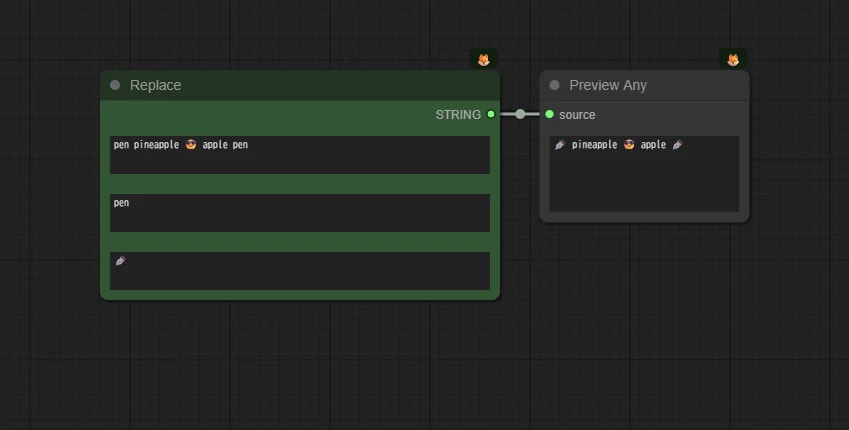
Replace ノード (文字置換)
指定した文字を別の文字に置き換えます。
(例:apple pen → orange pen)
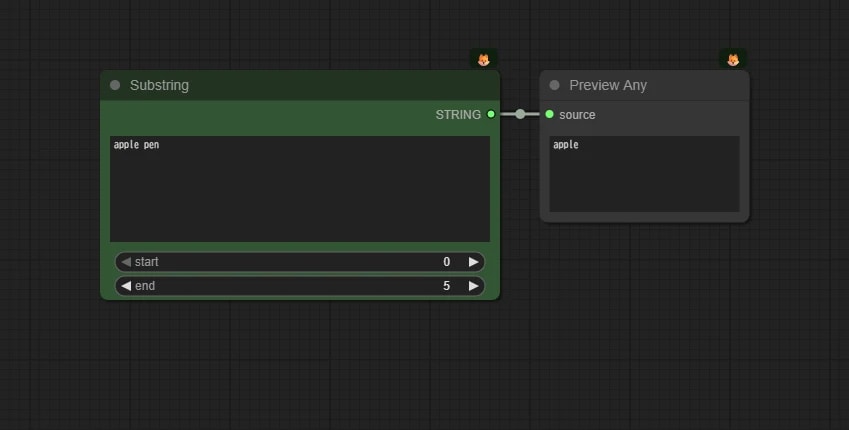
Substring ノード (文字抽出)
指定した範囲の文字を抽出します。
(例:apple → ppl)
start 番目から end 番目までの文字列を切り出します。
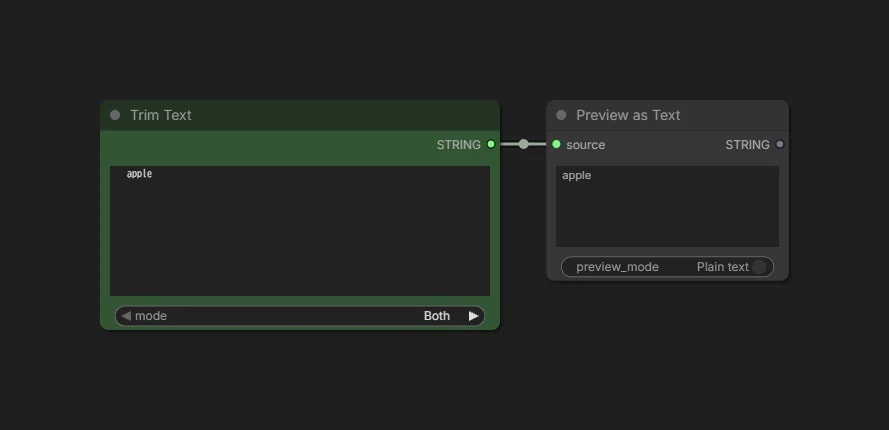
Trim Text ノード (空白削除)
文字列の前後にあるスペースを削除します。
(例:apple → apple)
- ユーザー入力などで意図しない空白が入ってエラーになるのを防げるため、地味ですが重要です。
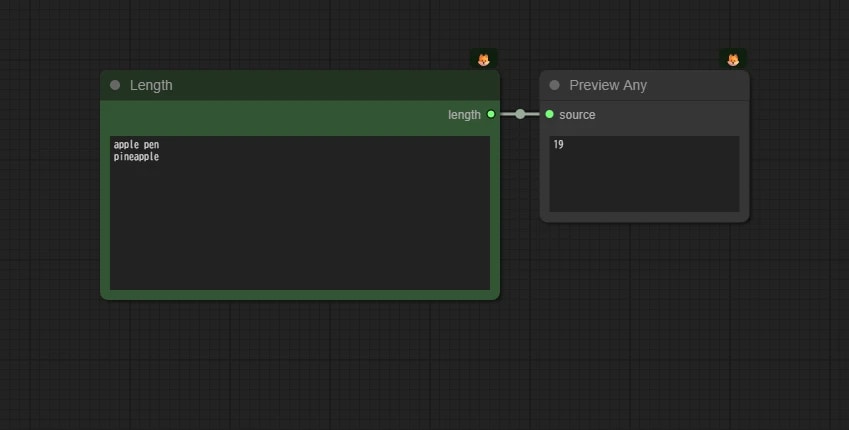
Length ノード (文字数カウント)
文字の長さをカウントします。
(例:apple → 5)
- スペースや改行も1文字としてカウントされます。
- 出力は int型(数値) になります。
高度な操作(正規表現)
「正規表現(Regex)」という記述ルールを使って、複雑な検索や置換を行います。
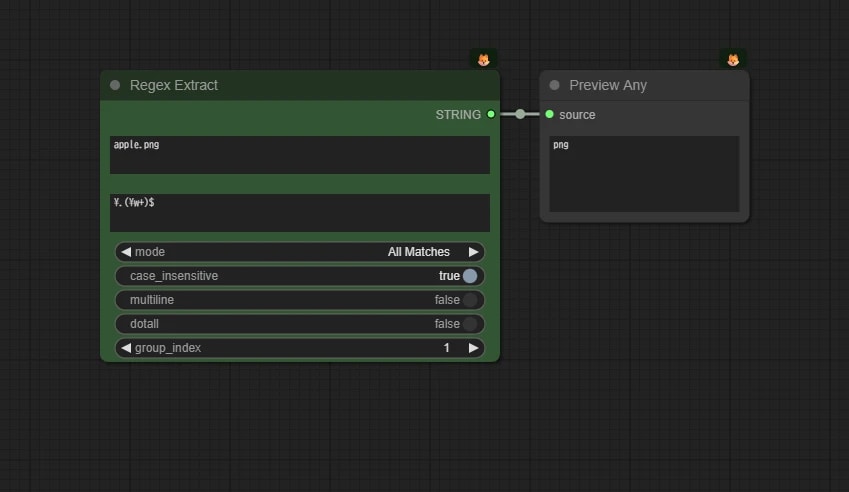
Regex Extract ノード
正規表現を使って、条件に一致する文字列を抽出します。
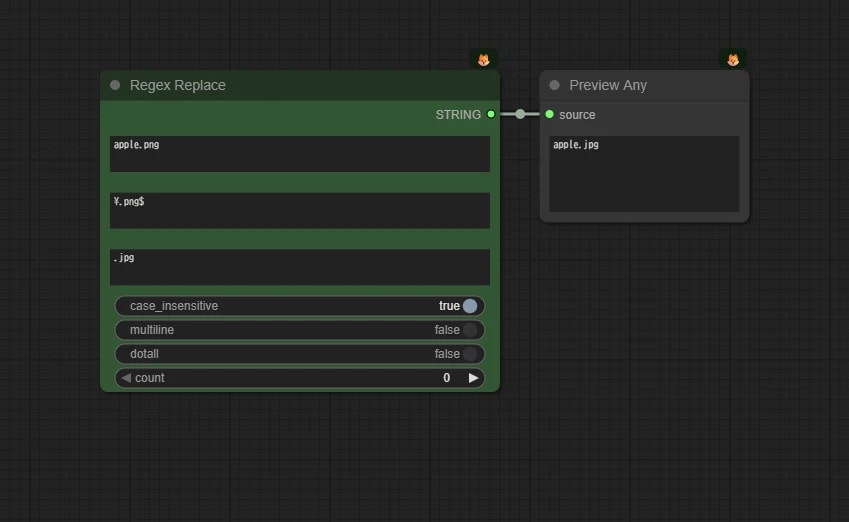
Regex Replace ノード
正規表現を使って、条件に一致する文字列を置き換えます。
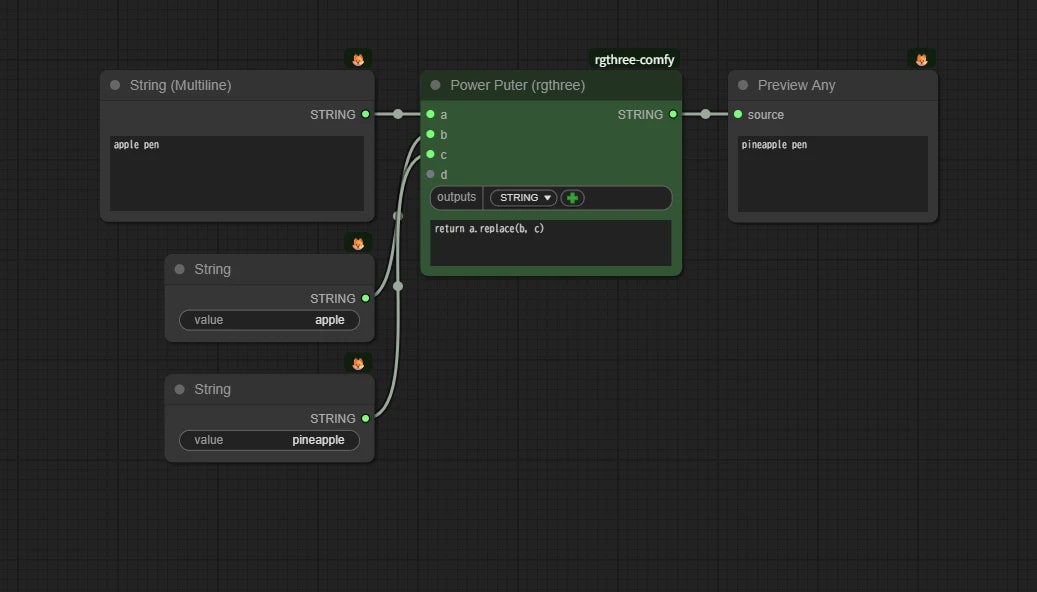
Power Puter (rgthree)
単純な計算 で使った rgthree-comfy のPower Puter ですが、stringの入力・出力も可能なため、上記のテキスト処理を含め柔軟に文字列の操作をすることができます。
power_puter_rgthree_replace.json
{
  "id": "dc1f9613-0a4c-46fb-ae08-9962d0e06147",
  "revision": 0,
  "last_node_id": 15,
  "last_link_id": 13,
  "nodes": [
    {
      "id": 3,
      "type": "PreviewAny",
      "pos": [
        2010.7783203125,
        740.6680297851562
      ],
      "size": [
        210,
        122.44491577148438
      ],
      "flags": {},
      "order": 4,
      "mode": 0,
      "inputs": [
        {
          "name": "source",
          "type": "*",
          "link": 10
        }
      ],
      "outputs": [],
      "properties": {
        "cnr_id": "comfy-core",
        "ver": "0.3.59",
        "Node name for S&R": "PreviewAny"
      },
      "widgets_values": []
    },
    {
      "id": 13,
      "type": "PrimitiveString",
      "pos": [
        1447.3487548828125,
        924.7716674804688
      ],
      "size": [
        210,
        58
      ],
      "flags": {},
      "order": 0,
      "mode": 0,
      "inputs": [],
      "outputs": [
        {
          "name": "STRING",
          "type": "STRING",
          "links": [
            11
          ]
        }
      ],
      "properties": {
        "cnr_id": "comfy-core",
        "ver": "0.3.59",
        "Node name for S&R": "PrimitiveString"
      },
      "widgets_values": [
        "apple"
      ]
    },
    {
      "id": 15,
      "type": "PrimitiveStringMultiline",
      "pos": [
        1382.8033447265625,
        740.6680297851562
      ],
      "size": [
        274.5454406738281,
        121.81818389892578
      ],
      "flags": {},
      "order": 1,
      "mode": 0,
      "inputs": [],
      "outputs": [
        {
          "name": "STRING",
          "type": "STRING",
          "links": [
            13
          ]
        }
      ],
      "properties": {
        "cnr_id": "comfy-core",
        "ver": "0.3.59",
        "Node name for S&R": "PrimitiveStringMultiline"
      },
      "widgets_values": [
        "apple pen"
      ]
    },
    {
      "id": 14,
      "type": "PrimitiveString",
      "pos": [
        1447.3487548828125,
        1045.05712890625
      ],
      "size": [
        210,
        58
      ],
      "flags": {},
      "order": 2,
      "mode": 0,
      "inputs": [],
      "outputs": [
        {
          "name": "STRING",
          "type": "STRING",
          "links": [
            12
          ]
        }
      ],
      "properties": {
        "cnr_id": "comfy-core",
        "ver": "0.3.59",
        "Node name for S&R": "PrimitiveString"
      },
      "widgets_values": [
        "pineapple"
      ]
    },
    {
      "id": 11,
      "type": "Power Puter (rgthree)",
      "pos": [
        1703.1837158203125,
        740.6680297851562
      ],
      "size": [
        261.7596435546875,
        176
      ],
      "flags": {},
      "order": 3,
      "mode": 0,
      "inputs": [
        {
          "name": "a",
          "type": "*",
          "link": 13
        },
        {
          "name": "b",
          "type": "*",
          "link": 11
        },
        {
          "name": "c",
          "type": "*",
          "link": 12
        },
        {
          "name": "d",
          "type": "*",
          "link": null
        }
      ],
      "outputs": [
        {
          "label": "STRING",
          "name": "*",
          "shape": 3,
          "type": "STRING",
          "links": [
            10
          ]
        }
      ],
      "properties": {
        "cnr_id": "rgthree-comfy",
        "ver": "0fb1e239a903e93ef626a8c20589b38f46e39dff"
      },
      "widgets_values": [
        {
          "outputs": [
            "STRING"
          ]
        },
        "return a.replace(b, c)"
      ],
      "color": "#232",
      "bgcolor": "#353"
    }
  ],
  "links": [
    [
      10,
      11,
      0,
      3,
      0,
      "*"
    ],
    [
      11,
      13,
      0,
      11,
      1,
      "*"
    ],
    [
      12,
      14,
      0,
      11,
      2,
      "*"
    ],
    [
      13,
      15,
      0,
      11,
      0,
      "*"
    ]
  ],
  "groups": [],
  "config": {},
  "extra": {
    "ds": {
      "scale": 1.4641000000000008,
      "offset": [
        -1282.8033447265625,
        -640.6680297851562
      ]
    },
    "frontendVersion": "1.27.5",
    "VHS_latentpreview": false,
    "VHS_latentpreviewrate": 0,
    "VHS_MetadataImage": true,
    "VHS_KeepIntermediate": true
  },
  "version": 0.4
}