単純な計算
画像のサイズを綺麗に半分にしたり、バッチサイズを調整したりと、単純な四則演算をする場面はしばしばあります。 そのためのノードを見ていきましょう。
以前はこれを行うためにカスタムノードを導入していましたが、現在、コアに同様の機能を持つノードが追加されたため、不要になりました。
Math Expression
{
  "id": "d7badf9d-4187-470d-a5b2-a2c4296f9f8e",
  "revision": 0,
  "last_node_id": 17,
  "last_link_id": 15,
  "nodes": [
    {
      "id": 4,
      "type": "PrimitiveInt",
      "pos": [
        637.447265625,
        501.5946960449219
      ],
      "size": [
        210,
        82
      ],
      "flags": {},
      "order": 0,
      "mode": 0,
      "inputs": [],
      "outputs": [
        {
          "name": "INT",
          "type": "INT",
          "links": [
            12
          ]
        }
      ],
      "properties": {
        "cnr_id": "comfy-core",
        "ver": "0.3.56",
        "Node name for S&R": "PrimitiveInt"
      },
      "widgets_values": [
        25,
        "fixed"
      ]
    },
    {
      "id": 13,
      "type": "PrimitiveInt",
      "pos": [
        637.447265625,
        650.788330078125
      ],
      "size": [
        210,
        82
      ],
      "flags": {},
      "order": 1,
      "mode": 0,
      "inputs": [],
      "outputs": [
        {
          "name": "INT",
          "type": "INT",
          "links": [
            13
          ]
        }
      ],
      "properties": {
        "cnr_id": "comfy-core",
        "ver": "0.3.56",
        "Node name for S&R": "PrimitiveInt"
      },
      "widgets_values": [
        7,
        "fixed"
      ]
    },
    {
      "id": 14,
      "type": "PrimitiveInt",
      "pos": [
        637.447265625,
        799.9819946289062
      ],
      "size": [
        210,
        82
      ],
      "flags": {},
      "order": 2,
      "mode": 0,
      "inputs": [],
      "outputs": [
        {
          "name": "INT",
          "type": "INT",
          "links": [
            14
          ]
        }
      ],
      "properties": {
        "cnr_id": "comfy-core",
        "ver": "0.3.56",
        "Node name for S&R": "PrimitiveInt"
      },
      "widgets_values": [
        100,
        "fixed"
      ]
    },
    {
      "id": 8,
      "type": "PreviewAny",
      "pos": [
        1160.396240234375,
        630.86669921875
      ],
      "size": [
        229.86948233789303,
        148.01343673743088
      ],
      "flags": {},
      "order": 4,
      "mode": 0,
      "inputs": [
        {
          "name": "source",
          "type": "*",
          "link": 15
        }
      ],
      "outputs": [],
      "properties": {
        "cnr_id": "comfy-core",
        "ver": "0.3.56",
        "Node name for S&R": "PreviewAny"
      },
      "widgets_values": [
        null,
        null,
        false
      ]
    },
    {
      "id": 17,
      "type": "ComfyMathExpression",
      "pos": [
        895.2985052944216,
        630.86669921875
      ],
      "size": [
        230.57851239669412,
        148
      ],
      "flags": {},
      "order": 3,
      "mode": 0,
      "inputs": [
        {
          "label": "a",
          "name": "values.a",
          "type": "FLOAT,INT",
          "link": 12
        },
        {
          "label": "b",
          "name": "values.b",
          "shape": 7,
          "type": "FLOAT,INT",
          "link": 13
        },
        {
          "label": "c",
          "name": "values.c",
          "shape": 7,
          "type": "FLOAT,INT",
          "link": 14
        },
        {
          "label": "d",
          "name": "values.d",
          "shape": 7,
          "type": "FLOAT,INT",
          "link": null
        }
      ],
      "outputs": [
        {
          "name": "FLOAT",
          "type": "FLOAT",
          "links": null
        },
        {
          "name": "INT",
          "type": "INT",
          "links": [
            15
          ]
        }
      ],
      "properties": {
        "cnr_id": "comfy-core",
        "ver": "0.17.0",
        "Node name for S&R": "ComfyMathExpression"
      },
      "widgets_values": [
        "a * b - c"
      ],
      "color": "#232",
      "bgcolor": "#353"
    }
  ],
  "links": [
    [
      12,
      4,
      0,
      17,
      0,
      "INT"
    ],
    [
      13,
      13,
      0,
      17,
      1,
      "INT"
    ],
    [
      14,
      14,
      0,
      17,
      2,
      "INT"
    ],
    [
      15,
      17,
      1,
      8,
      0,
      "INT"
    ]
  ],
  "groups": [],
  "config": {},
  "extra": {
    "ds": {
      "scale": 1.1,
      "offset": [
        -361.83628525232274,
        -70.86136312553573
      ]
    },
    "frontendVersion": "1.41.21",
    "VHS_latentpreview": false,
    "VHS_latentpreviewrate": 0,
    "VHS_MetadataImage": true,
    "VHS_KeepIntermediate": true
  },
  "version": 0.4
}
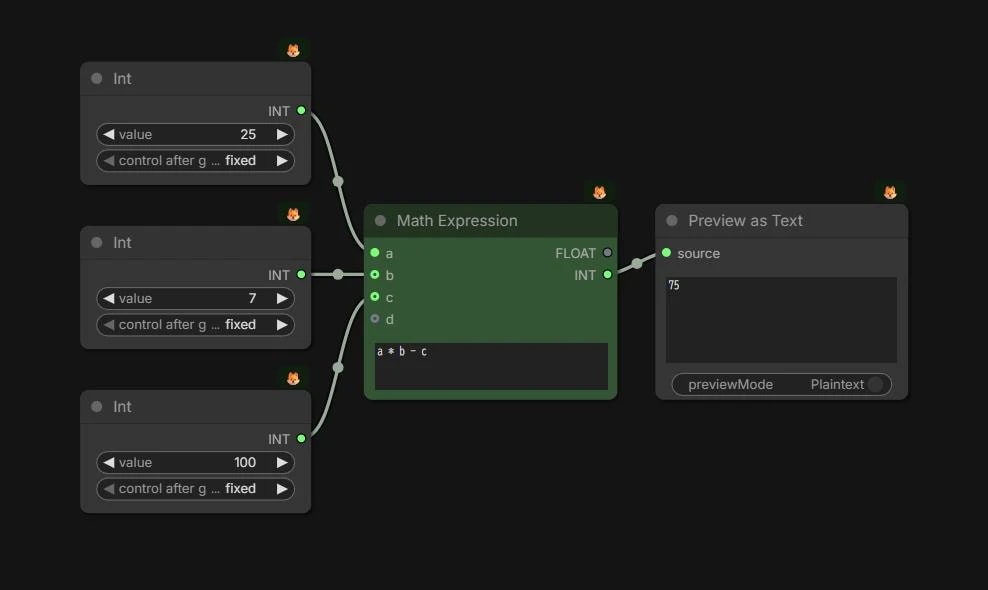
a, b, c にそれぞれ数値を入れられます。
その変数を利用して、a * b - c のように書けば、単純に算数を行うことができます。
また、これはPythonの式をそのまま使ったものなので、もう少し高度な計算も行えます。
a // b       # 整数除算(小数点以下切り捨て)
a % b        # 剰余(割り算の余り)
a ** b       # 累乗(べき乗)
(a + b) * c  # 括弧で優先順位を指定

abs(a - b)   # 絶対値を求める
min(a, b)    # 最小値を返す
max(a, b)    # 最大値を返す
round(a / b) # 四捨五入

(a > b) * 1  # 論理式:条件を数値化(a > bなら1, そうでなければ0)
(a == b) * 1 # 論理式:等しいかどうか判定
(a != b) * 1 # 論理式:異なるかどうか判定
int型とfloat型
数字には「型(タイプ)」があります。
ComfyUIでは主に int と float の2種類を使います。
- int型:整数のみ(例:
512,32,1)- バッチサイズや画像の解像度など
- float型:小数を扱える(例:
0.7,1.5,24.0)- KSamplerのstrengthや動画のfpsなど
適切な型で入出力しないとノードに接続できません。 「全部floatでええやん」というツッコミが聞こえてきそうですが、計算の効率や精度のために区別されているんですね…慣れてしまいましょう。
型の変換
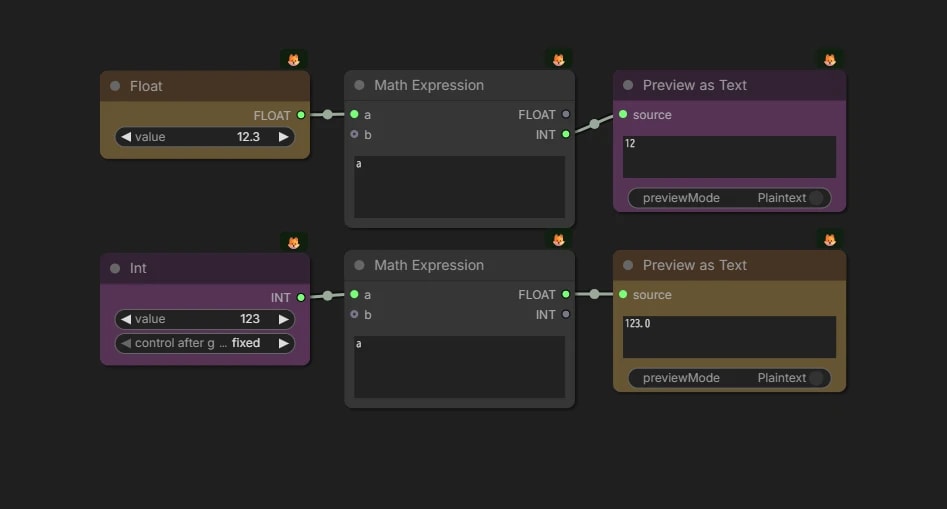
ちなみに、値を一度 Math Expression ノードに通すと、int ↔ float の変換を行えます。
入力がfloatでも、出力先がintなら自動的に変換してくれます。
{
  "id": "e3a56fbb-e287-4901-b6bc-746ce59c6ae4",
  "revision": 0,
  "last_node_id": 20,
  "last_link_id": 19,
  "nodes": [
    {
      "id": 17,
      "type": "ComfyMathExpression",
      "pos": [
        891.6943994826427,
        501.5946960449219
      ],
      "size": [
        230.57851239669412,
        128
      ],
      "flags": {},
      "order": 2,
      "mode": 0,
      "inputs": [
        {
          "label": "a",
          "name": "values.a",
          "type": "FLOAT,INT",
          "link": 16
        },
        {
          "label": "b",
          "name": "values.b",
          "shape": 7,
          "type": "FLOAT,INT",
          "link": null
        }
      ],
      "outputs": [
        {
          "name": "FLOAT",
          "type": "FLOAT",
          "links": null
        },
        {
          "name": "INT",
          "type": "INT",
          "links": [
            15
          ]
        }
      ],
      "properties": {
        "cnr_id": "comfy-core",
        "ver": "0.17.0",
        "Node name for S&R": "ComfyMathExpression"
      },
      "widgets_values": [
        "a"
      ]
    },
    {
      "id": 20,
      "type": "ComfyMathExpression",
      "pos": [
        891.6943994826427,
        681.7072069886606
      ],
      "size": [
        230.57851239669412,
        128
      ],
      "flags": {},
      "order": 3,
      "mode": 0,
      "inputs": [
        {
          "label": "a",
          "name": "values.a",
          "type": "FLOAT,INT",
          "link": 18
        },
        {
          "label": "b",
          "name": "values.b",
          "shape": 7,
          "type": "FLOAT,INT",
          "link": null
        }
      ],
      "outputs": [
        {
          "name": "FLOAT",
          "type": "FLOAT",
          "links": [
            19
          ]
        },
        {
          "name": "INT",
          "type": "INT",
          "links": []
        }
      ],
      "properties": {
        "cnr_id": "comfy-core",
        "ver": "0.17.0",
        "Node name for S&R": "ComfyMathExpression"
      },
      "widgets_values": [
        "a"
      ]
    },
    {
      "id": 18,
      "type": "PrimitiveFloat",
      "pos": [
        647.3646209969007,
        502.4510086415538
      ],
      "size": [
        210,
        58
      ],
      "flags": {},
      "order": 0,
      "mode": 0,
      "inputs": [],
      "outputs": [
        {
          "name": "FLOAT",
          "type": "FLOAT",
          "links": [
            16
          ]
        }
      ],
      "properties": {
        "cnr_id": "comfy-core",
        "ver": "0.18.0",
        "Node name for S&R": "PrimitiveFloat"
      },
      "widgets_values": [
        12.3
      ],
      "color": "#432",
      "bgcolor": "#653"
    },
    {
      "id": 4,
      "type": "PrimitiveInt",
      "pos": [
        647.3646209969007,
        685.0657704250875
      ],
      "size": [
        210,
        82
      ],
      "flags": {},
      "order": 1,
      "mode": 0,
      "inputs": [],
      "outputs": [
        {
          "name": "INT",
          "type": "INT",
          "links": [
            18
          ]
        }
      ],
      "properties": {
        "cnr_id": "comfy-core",
        "ver": "0.3.56",
        "Node name for S&R": "PrimitiveInt"
      },
      "widgets_values": [
        123,
        "fixed"
      ],
      "color": "#323",
      "bgcolor": "#535"
    },
    {
      "id": 8,
      "type": "PreviewAny",
      "pos": [
        1160.396240234375,
        501.5946960449219
      ],
      "size": [
        233.17526746186013,
        112
      ],
      "flags": {},
      "order": 4,
      "mode": 0,
      "inputs": [
        {
          "name": "source",
          "type": "*",
          "link": 15
        }
      ],
      "outputs": [],
      "properties": {
        "cnr_id": "comfy-core",
        "ver": "0.3.56",
        "Node name for S&R": "PreviewAny"
      },
      "widgets_values": [
        null,
        null,
        null
      ],
      "color": "#323",
      "bgcolor": "#535"
    },
    {
      "id": 19,
      "type": "PreviewAny",
      "pos": [
        1160.396240234375,
        681.7072069886606
      ],
      "size": [
        233.17526746186013,
        112
      ],
      "flags": {},
      "order": 5,
      "mode": 0,
      "inputs": [
        {
          "name": "source",
          "type": "*",
          "link": 19
        }
      ],
      "outputs": [],
      "properties": {
        "cnr_id": "comfy-core",
        "ver": "0.3.56",
        "Node name for S&R": "PreviewAny"
      },
      "widgets_values": [
        null,
        null,
        null
      ],
      "color": "#432",
      "bgcolor": "#653"
    }
  ],
  "links": [
    [
      15,
      17,
      1,
      8,
      0,
      "INT"
    ],
    [
      16,
      18,
      0,
      17,
      0,
      "FLOAT"
    ],
    [
      18,
      4,
      0,
      20,
      0,
      "INT"
    ],
    [
      19,
      20,
      0,
      19,
      0,
      "FLOAT"
    ]
  ],
  "groups": [],
  "config": {},
  "extra": {
    "ds": {
      "scale": 1.2100000000000006,
      "offset": [
        -159.30059159006697,
        -150.94303911637104
      ]
    },
    "frontendVersion": "1.41.21",
    "VHS_latentpreview": false,
    "VHS_latentpreviewrate": 0,
    "VHS_MetadataImage": true,
    "VHS_KeepIntermediate": true
  },
  "version": 0.4
}
【小技】入力欄での簡易計算
ノードを使うほどでもない簡単な計算なら、入力欄で直接計算式を書くと、計算された値が入力されます。
Power Puter (rgthree)
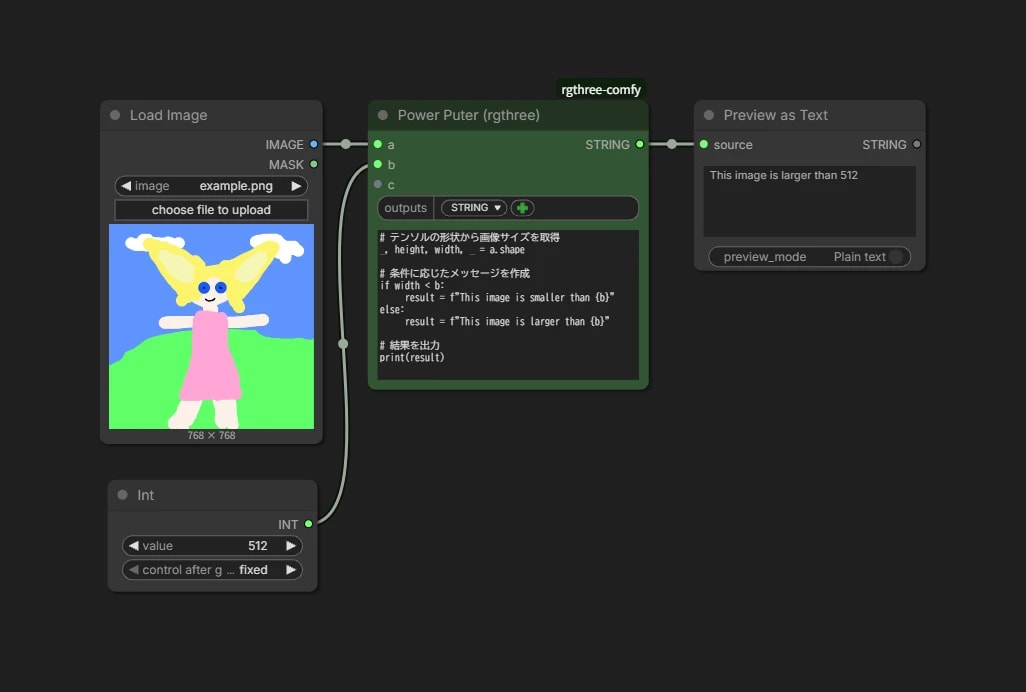
rgthree-comfy で追加される Power Puter を使うと、画像のサイズを取得できたりif文が使えたりと、もはやほぼプログラミングですが、より複雑な処理をすることができます。
{
  "id": "c05fc5ca-84cc-4a12-9e1a-3dbddf62dcde",
  "revision": 0,
  "last_node_id": 7,
  "last_link_id": 6,
  "nodes": [
    {
      "id": 3,
      "type": "LoadImage",
      "pos": [
        3602.8349609375,
        -692.7393798828125
      ],
      "size": [
        222.798828125,
        314
      ],
      "flags": {},
      "order": 0,
      "mode": 0,
      "inputs": [],
      "outputs": [
        {
          "name": "IMAGE",
          "type": "IMAGE",
          "links": [
            1
          ]
        },
        {
          "name": "MASK",
          "type": "MASK",
          "links": null
        }
      ],
      "properties": {
        "Node name for S&R": "LoadImage",
        "cnr_id": "comfy-core",
        "ver": "0.3.59"
      },
      "widgets_values": [
        "example.png",
        "image"
      ],
      "widgets_values_named": {
        "image": "example.png",
        "upload": "image"
      }
    },
    {
      "id": 4,
      "type": "PrimitiveInt",
      "pos": [
        3610.344970703125,
        -312.99334716796875
      ],
      "size": [
        210,
        82
      ],
      "flags": {},
      "order": 1,
      "mode": 0,
      "inputs": [],
      "outputs": [
        {
          "name": "INT",
          "type": "INT",
          "links": [
            2
          ]
        }
      ],
      "properties": {
        "Node name for S&R": "PrimitiveInt",
        "cnr_id": "comfy-core",
        "ver": "0.3.59"
      },
      "widgets_values": [
        512,
        "fixed"
      ],
      "widgets_values_named": {
        "value": 512,
        "fixed": "fixed"
      }
    },
    {
      "id": 1,
      "type": "Power Puter (rgthree)",
      "pos": [
        3870.6129608154297,
        -692.7393798828125
      ],
      "size": [
        281.0826721191406,
        259.6524963378906
      ],
      "flags": {},
      "order": 2,
      "mode": 0,
      "inputs": [
        {
          "name": "a",
          "type": "*",
          "link": 1
        },
        {
          "name": "b",
          "type": "*",
          "link": 2
        },
        {
          "name": "c",
          "type": "*",
          "link": null
        }
      ],
      "outputs": [
        {
          "label": "STRING",
          "name": "*",
          "shape": 3,
          "type": "STRING",
          "links": [
            3
          ]
        }
      ],
      "properties": {
        "cnr_id": "rgthree-comfy",
        "ver": "0fb1e239a903e93ef626a8c20589b38f46e39dff"
      },
      "widgets_values": [
        {
          "outputs": [
            "STRING"
          ]
        },
        "# テンソルの形状から画像サイズを取得\n_, height, width, _ = a.shape\n\n# 条件に応じたメッセージを作成\nif width < b:\n    result = f\"This image is smaller than {b}\"\nelse:\n    result = f\"This image is larger than {b}\"\n\n# 結果を出力\nprint(result)\n\n# 結果を返す\nreturn result"
      ],
      "widgets_values_named": {
        "outputs": {
          "outputs": [
            "STRING"
          ]
        },
        "code": "# テンソルの形状から画像サイズを取得\n_, height, width, _ = a.shape\n\n# 条件に応じたメッセージを作成\nif width < b:\n    result = f\"This image is smaller than {b}\"\nelse:\n    result = f\"This image is larger than {b}\"\n\n# 結果を出力\nprint(result)\n\n# 結果を返す\nreturn result"
      },
      "color": "#232",
      "bgcolor": "#353"
    },
    {
      "id": 5,
      "type": "PreviewAny",
      "pos": [
        4196.6748046875,
        -692.7393798828125
      ],
      "size": [
        231.9787423344451,
        140.7226323589715
      ],
      "flags": {},
      "order": 3,
      "mode": 0,
      "inputs": [
        {
          "name": "source",
          "type": "*",
          "link": 3
        }
      ],
      "outputs": [
        {
          "name": "STRING",
          "type": "STRING",
          "links": null
        }
      ],
      "properties": {
        "Node name for S&R": "PreviewAny",
        "cnr_id": "comfy-core",
        "ver": "0.3.59"
      },
      "widgets_values": [],
      "widgets_values_named": {}
    }
  ],
  "links": [
    [
      1,
      3,
      0,
      1,
      0,
      "*"
    ],
    [
      2,
      4,
      0,
      1,
      1,
      "*"
    ],
    [
      3,
      1,
      0,
      5,
      0,
      "*"
    ]
  ],
  "groups": [],
  "config": {},
  "extra": {
    "ds": {
      "scale": 0.9229599817707259,
      "offset": [
        -3016.5373781830453,
        1030.6340308008669
      ]
    },
    "frontendVersion": "1.51.9",
    "VHS_latentpreview": false,
    "VHS_latentpreviewrate": 0,
    "VHS_MetadataImage": true,
    "VHS_KeepIntermediate": true
  },
  "version": 0.4
}